iOS Today 820 Transcript
Please be advised that this transcript is AI-generated and may not be word-for-word. Time codes refer to the approximate times in the ad-free version of the show.
Mikah Sargent [00:00:00]:
Coming up on iOS Today, Rosemary Orchard and I, Micah Sargent, talk about the Apple event. Stay tuned. Podcasts you love.
Rosemary Orchard [00:00:12]:
From people you trust.
Mikah Sargent [00:00:15]:
This is TWiT. This is iOS Today, episode 820 with Rosemary Orchard and me, Micah Sargent, recorded Tuesday, September 15th, 2026 for Thursday, September 17th, 2026. The iPhone folds and everything else Apple announced. Hello and welcome to iOS Today. This is the show where we talk all things iOS, iPadOS, watchOS, HomePodOS, and well, all of the OSes that Apple has to offer. We love to help you make the most of your Apple devices by telling you about how you can use them. I am one of your hosts. My name is Micah Sargent.
Rosemary Orchard [00:00:59]:
And I am your duo host, Rosemary Orchard, and I'm very pleased and excited to be here today.
Mikah Sargent [00:01:05]:
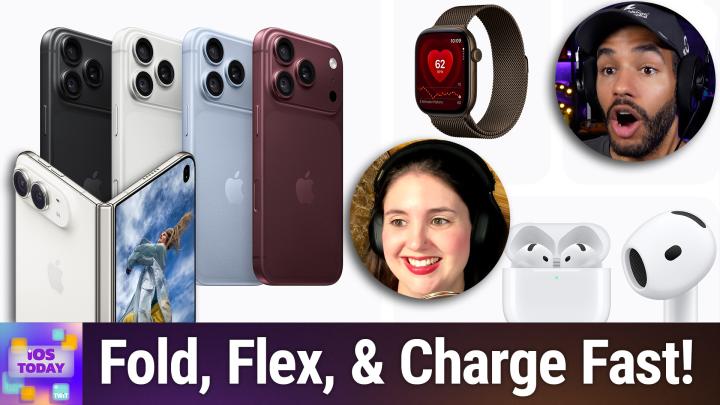
Very clever. I love it. Um, yes, this is of course the episode that follows the Apple event, which means that it is time to talk about the Apple event. Uh, Leo Laporte and I covered the event live, and well, you can go and watch that in the club if you'd like to see our live commentary, but we were Very excited to see Apple debut some new devices, and of course we've got a lot to talk about, so we really should just get into it. Let's start with the new standard—well, not even standard—the new non-folding iPhones. Apple peeled back the tape on—I don't know—they revealed the iPhone 18 Pro and 18 Pro Max. Now. These devices, a little pricey, $1,199 for the Pro, $1,299 for the Pro Max to kick things off, coming in black, silver, glacier, and a new burgundy color.
Mikah Sargent [00:02:18]:
Let's start there, Rosemary. How are you feeling about the colors?
Rosemary Orchard [00:02:25]:
I mean, it's black and white and a burgundy. a color that once saw something that resembled the shade of blue. And then this is not purple. I'm sorry, I was promised purple, people. This is not purple. Uh, no, I mean, it's, it's a nice color. It's, it's definitely more reddish than bluish, and like, you know, red plus blue equals purple. I feel like a little bit more purple in there would be nice.
Rosemary Orchard [00:02:48]:
Uh, but you know, it's a nice enough color. Uh, if I were buying one of these, I'd probably go with Glacier myself, uh, just because it's It's a little bit different, but it's not so different that I wouldn't be able to pass it down to either of my parents. My dad in particular, he might have feelings about having a reddish iPhone. But yeah, as it is, I'm not 100% certain I'm getting a Pro. So, Micah, what do you think? If you were getting an iPhone 18 Pro, what color would you be getting?
Mikah Sargent [00:03:21]:
If I was getting one of these, I think I would get the Glacier color. It is really pretty. And it is not a bad name for what it is, which is how I feel about burgundy. I don't like that they call that color burgundy. That is not any burgundy I have ever seen. That said, I think that all of the colors look fine on these new phones. The kind of big headline, if I were to be, yeah, exactly. If I were to be getting an iPhone 18 Pro Max, because of course I would go for the Max, if that's the way that I was going, then I would get Glacier.
Mikah Sargent [00:04:05]:
But we'll have to talk later about what we both are doing. We gotta talk about what's new here in these phones. And first and foremost is a whole new variable aperture that is on the 48-megapixel Fusion main camera. Apple showed that it now has these 6 blades that are able to move And that gives it 4 manual stops. I think that's f/1.48 for low light. And what's cool is that there is a developer API attached to it so that developers can make use of the variable aperture. Now, what this means is that more light can be let in at when you are working with low-light scenes, it also means that it helps to make some changes to the depth of field. Now, I think it's important that we sort of modulate our expectations when it comes to what these devices are capable of in terms of even having variable aperture, because on something so small, It is not going to make a huge, huge difference.
Mikah Sargent [00:05:35]:
Chris Marquardt, who is of course our sort of photo expert, or who is a photo expert and is our photo expert on the network, was recently talking about these new phones with Leo and mentioned that with a sensor as small as you'll find on the iPhone, and you know, that's saying as small as you'll find, these are pretty big sensors for a smartphone. The difference in depth of field is not huge, and so much of what Apple is doing is the computational work afterwards. So it does become a little bit of a marketing, um, push, is, is the sort of outcome that I'm hearing and understanding. Uh, and I think for me, Rosemary, the big thing about it is That is a serious point of failure. I thought about what happens when I drop this phone that now has these laser-cut moving blades and something gets a little bit off-kilter. That scares me.
Rosemary Orchard [00:06:41]:
Yeah. Yeah. They said that they're like as thin as a hair, which, you know, like obviously hairs come in different thicknesses, but still, like taking the average one there, that's still pretty thin. Yeah. I mean, I assume I assume this is Apple. I— they must have done drop tests on this. Uh, how much drop testing they have done and said this is an acceptable— like, if you've dropped it this many times that it's failed, that's okay. But I know I am just generically clumsy.
Rosemary Orchard [00:07:15]:
Uh, so I was in the kitchen the other day, I was holding my phone checking a recipe, turned around and slammed my phone into the cabinet. Uh, in the kitchen because, uh, it was exactly where it's always been and somehow not where I expected it to be. Don't ask me how that works. ADHD comes with a certain level of clumsiness, apparently. Uh, but either way, I smacked my phone pretty darn hard into the cabinet. Uh, it was fine, nothing broke, everything still works. I do have it in a case. It's just a cheapy pretty case with flowers on it.
Rosemary Orchard [00:07:45]:
Uh, but you know, I, I don't know if the camera would have survived that. In particular, I'd be interested in finding out what happens if you drop it and the camera is currently in use, uh, as in like those flaps are possibly in motion of some— in some way or shape or form. Do they immediately detect that it's falling, uh, and freeze in place or put themselves into a safe position? Uh, I, I don't know what happens. I do know the iPhone and Apple Watch have fall detection to an extent. You know, it's not perfect, but it's very good. Are they maybe using the accelerometer for that? That would be pretty cool, but I'll be interested in the iFixit teardown of this just to find out, you know, how easy it is to break it when they take it apart, if they do by accident.
Mikah Sargent [00:08:35]:
Yeah. Moving along in the camera app, there are some new pro controls available because of what this enables, aperture, shutter speed, white balance controls that are a little bit more in depth. You get a live histogram, which is exciting. And I love the idea of a few more adjustments to photographic styles. Now, some people despise photographic styles because they are a little confusing. I've actually done an episode of Hands-On Apple that talks about photographic styles, but on the new device, you are able to adjust texture and grain. And for someone who loves a little bit of grain added to their photos, I think that that is a super cool addition to the camera system. On top of that, something that I was very excited to see added, although I'm still kind of trying to figure out what's going on, is the new feature that is called Apple Reference Image.
Rosemary Orchard [00:09:59]:
Ooh.
Mikah Sargent [00:10:00]:
In this world of edited photos and AI-edited photos and AI-generated photos, of course, we're looking for ways to be able to determine when a photo is, Real is a hard word to use here, but when a photo is taken by a camera and has been unaltered, and Apple Reference Image, it will at the sensor level sign every single pixel of that image, and then it makes this unalterable digital negative. So that way, if you want to, when you share this photo, someone is able to look at what the original signed photograph is. And then see how you have edited it, edited it after the fact. Now this is an opt-in feature. Apple says it won't be in China at launch, and in the EU folks will be able to view Apple reference images but will not currently or when it is released be able to capture them. So that's something to bear in mind. Now something that is very exciting when it comes to the new iPhone 18 Pro and 18 Pro Max is. Of course, what we have heard about battery life.
Mikah Sargent [00:11:25]:
Apple quotes 36 hours of video for the iPhone Pro and 45 hours on the Pro Max. So that is, that's all, that's, that's an incredible amount of battery life. Also charging is great, 50% charged in just 15 minutes. While plugged in and in, um, in the, oh, so, so if you only plug the phone in for 5 minutes, if you take your iPhone, uh, 18 Pro Max and you plug that iPhone 18 Pro Max in for 5 minutes to charge it, that's 7 hours of use that you could get from that. That's wild.
Rosemary Orchard [00:12:13]:
Yeah. The 15 minutes for 50% thing. That's something that really stood out to me during the, the presentation because I don't know how many times I've been between errands. Like, I've come home, I've got a little bit, I've got stuff to do, I've got to put away some shopping, get some other bits out, and then go again. And my phone is running low. Just being able to plug it in, you know, I always plug it into a fast charger if I'm in this situation, but being able to plug it in and be and say, cool, if I spend the next 15 minutes at home sorting stuff out and then I leave again, I'm going to have at least 50% battery. That is a winner for me. That's Just 100%.
Rosemary Orchard [00:12:49]:
I've won. I would be absolutely loving that. Sadly, I'm not going to be getting an iPhone 18 Pro or Pro Max, so I'm not going to be getting that feature. But there is a very similar one. But I do just think that this is such a good win. You know, there's always people, you know, that you see people sitting at airports, you know, on the floor by the gate trying to plug in their phone to charge it. You know, if they've got a decently fast charger, which I really hope folks, if you haven't invested in a decently fast charger or you've got family members that haven't got good chargers. FYI, there is a gift-giving season coming up.
Rosemary Orchard [00:13:26]:
You should definitely be looking at getting people some nice fast chargers regardless of what personal device they have. As long as it charges via USB-C, get them a nice USB-C charger for, you know, whatever seasonal festivities you'll be celebrating where gift-giving is appropriate because it is well worth it, especially if people are upgrading to the iPhone 18 Pro. Max it out. Get whatever the fastest charger on the market is that you can get that works for you. And a fancy fast charging cable. Cables go support the 240 watts as well. But yeah, if you do that, I think you will be in, yeah, you'll be really enjoying that. Because those 15 minutes travel, just running around like a lunatic because you've got so many things on, it's 15 minutes for 50% battery is insane, but in a good way.
Mikah Sargent [00:14:14]:
Absolutely. That, of course, is enabled by the new A20 Pro. This is a 2-nanometer chip. It's got dual 16-core neural engine. So that is an upgrade in terms of AI throughput. And Apple spent quite a bit of time talking about the vapor chamber in the iPhone 18 Pro and Pro Max. That's 3 times the surface area of the vapor chamber of years past. Year of versions previous.
Mikah Sargent [00:14:49]:
And that means 40% better sustained performance for people who are doing AI stuff on their phones. That is an important aspect for sure. The other changes for the iPhone 18 Pro and Pro Max include a smaller Dynamic Island. So the actual Dynamic Island, the physical hardware part is smaller. But that also means improvements to how the Dynamic Island works. 3 live activities can be shown at once. And I have always loved the Dynamic Island. I think it's a great little feature that combines hardware and software together.
Mikah Sargent [00:15:33]:
And I use it all the time in terms of seeing live activities. So very excited to see improvements there. Apple, of course, is bragging about its own chips, including its N1 wireless chip, its C2 modem that has millimeter wave technology. And I think that the, of course, big deal there is overall variable aperture on these devices. And in my opinion, the charging capabilities of these new phones, that is One thing, of course, to be aware of is that this was an event that featured the iPhone 18 Pro and Pro Max, but did not feature a standard iPhone 18. And, you know, it was funny not seeing many people talk about that. It's what many of us in the tech press expected, but what I thought was interesting was how the general public didn't seem to say, What about the whole thing where there's a normal iPhone? Which I thought was kind of funny, but that is the case, as it were. Now, that's the iPhone 18 Pro and 18 Pro Max.
Mikah Sargent [00:16:53]:
I actually wanna talk about the other iPhone that was announced at this event because I think Rosemary, you and I have been waiting to be able to talk about this.
Rosemary Orchard [00:17:03]:
Maybe.
Mikah Sargent [00:17:03]:
And despite the fact that it was a one more thing for the event, we're not gonna do a one more thing here. We're just gonna get Rosemary, what other iPhone did Apple announce at its event?
Rosemary Orchard [00:17:16]:
Uh, I don't know, Micah. I heard it folds. It's called the iPhone Duo because it's a 2-in-1, uh, device. And, uh, yeah, I'm very excited by this. I don't know if I'm actually personally gonna love it when I get it, but I'm planning on ordering an iPhone Duo, which is the power A passport-sized folding iPhone, which features some cool things like a hidden camera on the inside of the screen. So there are pixels in front of the camera so you don't see the camera during normal use. USB-C Apple Pencil support, standby mode. It can work like propped open to sort of sit on a nightstand.
Rosemary Orchard [00:17:58]:
Yeah, there's an iPhone Duo coming. And it's, it's very exciting. Mikey, you've got to really sort of I can see that happy grin on your face right now. I think you are also excited by this.
Mikah Sargent [00:18:12]:
Yes. The iPhone 18 duo, I think part of what has me excited about it is the fact that leading up to it, I was talking to Anthony Nielsen about this. He and I both were like, we did not want to be, Drawn into this, like both of us were were going no no foldable for us, and then Apple revealed this foldable, and it's pretty cool. So first and foremost, Apple pulled an OG iPad moment in terms of giving us a price that was lower than I think at least I was expecting. Still very expensive at $1,999. That's a rather expensive. Starting price, but if you have a current model iPhone, you can get a pretty good trade-in for it. And yeah, that I think makes a big difference, takes a chunk out of it.
Mikah Sargent [00:19:11]:
But it was better than I was expecting in a lot of ways. And after the event, there was a lot of talk about what you would be giving up for this device. One of the things, of course, that we'll talk about in Touch ID. There's no Face ID for it.
Rosemary Orchard [00:19:33]:
Mm-hmm.
Mikah Sargent [00:19:34]:
And we'll talk about why that's the case as well. But then also that if you had an iPhone 17 Pro or Pro Max, then it is in some ways a direct step over on camera and in some ways a step down on camera. And so that's something to be aware of as well. But this is an all-new form factor for Apple. And frankly, I think they've nailed it in terms of the marriage of the hardware and the software together. When it's open, 7.6-inch inner display, which of course is 50% larger than the 18 Pro Max. They have used their nano-texture finish on it, which is of course an anti-glare feature, but that cleverly is used to hide that crease that you get on foldable displays. Closed, it has a 5.4-inch inch outer display.
Mikah Sargent [00:20:36]:
And even that display, the outer display, is 90% of an i— of an 18 Pro's screen area.
Rosemary Orchard [00:20:44]:
Mm-hmm.
Mikah Sargent [00:20:45]:
And what's great as well is that Apple has cleverly made it so that the aspect ratio is the same across the screens. So whether you're using it on the front or you're using it within, uh, that aspect ratio remains the same. Now, Touch ID, as I mentioned, it's on the side button. So a lot like an iPad mini. And of course, I mean, Rosemary, you, I believe, sent me a video. I did. Yeah. About this.
Mikah Sargent [00:21:16]:
If you want to kind of share the thinking behind why we don't have Face ID.
Rosemary Orchard [00:21:24]:
Well, obviously there is a physical size aspect to it, right, folks? So the iPhone, Duo is super, super skinny unfolded. Obviously folded, it's twice the thickness. But you know, there is only so much that they can fit in there. But if they were trying to put the Face ID in there, they'd have to put Face ID in there twice. Once for when it's closed and then once for when you open it. And the problem with that is because this is a thing that's used for payment, you don't wanna have a trade-off of like, oh, but I have to close my iPhone to be able to pay because I can only Face ID on the outside, or I left my iPhone open and came back to it, so therefore I need to close it and reopen it to be able to use Face ID. So by putting the Touch ID on the side, it is on the right-hand side of the device, to be clear. I'm not entirely certain how well this is going to work for left-handed folks.
Rosemary Orchard [00:22:17]:
Most, most folks who I know who are left-handed have grown up using a lot of right-handed things, scissors in particular, and have learned ways to compensate for this. Hopefully there'll be a way that they can just flip it upside down for them. And plug it in at the top instead of the bottom. But the Touch ID is because you need to be able to pay as well as actually use Face ID. And this way there's just one device or one chip that is responsible for that secure authorization method that Touch ID does, instead of you trying to cram 2 in there, which I'm, I'm I am not up to date on the specs. I don't know exactly how that would work. I'm pretty certain it would require 2 chips, 2 Face IDs, 2 chips. And I mean, they've already got 2 batteries in there which work as one, which is pretty impressive.
Rosemary Orchard [00:23:06]:
But I'm not entirely certain how marrying or mawedging— I spotted that earlier, Micah. You need to— I think we all need to watch Robin Hood: Men in Tights again. But I'm not entirely certain how marrying those together would work and if that's actually possible at this point in time. And I think Touch ID is a sensible trade off because this way everything works the same way and the button is in the same position regardless of how you've got it open.
Mikah Sargent [00:23:34]:
Yeah, yeah, exactly. There's a lot, of course, that remains unknown until people have their hands on these more than we saw at the event and are able to kind of share their thoughts on them. But, you know, we're working with what Apple has shared. The device, the iPhone Duo, it's made of grade 5 titanium. It's been polished to a mirror finish. And I thought it was pretty incredible seeing how the hinge itself was built. 100+ parts all came together to make that hinge. It has Ceramic Shield 2 on the front glass.
Mikah Sargent [00:24:16]:
It's IP68, which if I remember correctly, is higher than we have seen from other foldables. And that's huge.
Rosemary Orchard [00:24:26]:
Yes.
Mikah Sargent [00:24:27]:
When it comes to the hinge.
Rosemary Orchard [00:24:29]:
Yeah, it's dust resistant, which I believe is one of the things that many of the other foldables out there are currently missing, uh, where dust is a problem. And unfortunately, I don't know, folks, have you ever looked at one of the hinges on your door, particularly like an interior door in your house, one of the lower down ones, if you've got pets, uh, and how often you clean those? Probably don't clean it that often. If you go and look at one, I bet you'd be surprised how much dust is in the hinge, uh, and how much gunk is in there. Hinges are really good at picking up dust and gunk and like locking it in and getting it inside the thing. So yeah, yeah, this IP68 rating is, I think it's higher. Somebody in the chat, YZF Donor, has just said it's higher than most devices that they believe because they think most things are IP67 rated, which does—
Mikah Sargent [00:25:18]:
Yeah.
Rosemary Orchard [00:25:19]:
IP67 is ringing a lot of bells for me. So that sounds correct. So have to double check, but I'm pretty certain that, yeah, it's very, very high as far as these ratings go. So that's good. I mean, it's great. It doesn't quite make up for the lack of telephoto lens, but I don't know. I don't know. I'll see how I do without my telephoto lens.
Rosemary Orchard [00:25:41]:
I use mine a lot, unfortunately.
Mikah Sargent [00:25:45]:
I use my— I didn't— I only recently started to, but I am I've been using so often my macro lens, which is essentially the ultra-wide lens. And it, I didn't realize the quality of the 17 Pro Max, its macro quality. And the fact that you don't really need to have, 'cause I was gonna buy a fancy macro lens and try to, and then, I started just using the one and the features that's built that are built into the camera to do macro and thought and realized, oh my goodness, with just a little bit more light, by by adding just a little bit more light to the shot, I can get incredible up close photos of the stuff that I'm working on. And so I thought that was really exciting. The cameras that are included with the Duo are the 48 megapixel Fusion Main, and so it has that. That sort of telephoto that's built in by having 2x optical quality, as they call it, plus the 48-megapixel Fusion Ultra Wide. It has Center Stage front and it has an under-display FaceTime camera. And that is a little bit different from what we've experienced in the past.
Mikah Sargent [00:27:16]:
The— because it is a foldable, because it is the Duo, it has a few tricks. The Smart Take feature, which will shoot photographs whenever you pose. And so you switch between poses and then it kind of notices that you've changed poses and then it will snap a few. And then you can, with the rear camera, the selfies have an outer screen preview so you can get a better understanding of what it looks like. That's very exciting. And then a feature called Kid Cue, which I would like to call Pet Cue. I hope that they will add Pet Cue because it will sort of display some animations on the screen in the hopes that it will draw in the child for the photo, draw the child's attention for the photograph, which is fun. Mm-hmm.
Rosemary Orchard [00:28:10]:
Yes. Also, I feel I should mention, Micah, the selfie mode that you mentioned, being able to use the front-facing screen with the rear-facing camera for selfies. That also works when taking photos of people. I don't know how many times I've asked somebody to take a photo of me and they've gone and they've taken a couple of pictures and given it back and said, there you go. And I've said, thank you. And I've looked at the pictures and gone, okay, now I have to wait for you to walk away and find somebody else to retake this photo because it does not look like what I envisioned at all because I could couldn't see myself like at the moment they were taking the photo. So you actually have the option of showing people the photo that you're taking on the outside camera. Well, yeah, so you can use the inside as your viewfinder, which is great.
Rosemary Orchard [00:28:50]:
I absolutely love that idea. That's genius. So yeah, I'm very excited about that because it makes perfect sense, right? If you can use it for selfies, why not use it to help people take better photos of themselves?
Mikah Sargent [00:29:01]:
Exactly. iOS 27, There are a few things that have happened as part of iOS 27 on the Duo. Controls and the dock moved to the side of the phone as opposed to—
Rosemary Orchard [00:29:17]:
Mm-hmm.
Mikah Sargent [00:29:17]:
The side of the screen as opposed to being on the bottom. It was funny because I don't think of the, I mean, it, I've, the iPhone has a dock, but given how long it's been where it is on iOS and the fact that it doesn't work quite like the dock on macOS, I hadn't really considered it being a dock in so long. And so when it got moved to the side, my brain immediately sort of reanalyzed the idea that the iPhone has a dock. And I thought, oh cool, they gave it a dock. And then I thought, oh wait, no, it's always had a dock, but it's on the side now, which is fun. It is also able to do, oh, it moves the Dynamic Island vertically and it has Split View, with 2 apps side by side, which is exciting so that you can, we've seen this of course on the iPad, but this is the first time that it is available on the iPhone. And it is set up so that you can do what are called saved app pairs. So if there are certain apps that you always use together, you can say, link these 2 together so that when I launch this app, this one always launches on the other side.
Mikah Sargent [00:30:38]:
And then at any point you can undo them as well. And whereas right now with the iPhone, the 17 and back that feature standby, those require you to have your phone on a charger and you turn the phone into landscape and then it activates standby. Given that you can take this phone, fold it in sort of a camping tent style, as it were, you can then put it onto your table. And have standby mode activated so that it works a little bit like a, you know, an alarm or whatever it is that you want to do with standby because I use standby all the time on my iPhone 17. So I'm really excited about the options here. It does have 2, not 1, but 2 batteries inside of it. They're spread, you know, across the device, but they do act as one. Apple says 31 hours of video if you're using the inner display, 44 hours of video on the outer, and then they quote 24 hours of mixed display use.
Mikah Sargent [00:31:54]:
It's eSIM only. There was no place to put a SIM card slot. And there are currently 2 first-party case, case slash cover options. There's the Duo case, which Apple charges $79, and then there's And then there's the Folio that has the kickstand as we're showing on screen right now. That is $129, which is quite the price.
Rosemary Orchard [00:32:24]:
It is. And something that's interesting about the Folio, and it tells you a little bit more about the iPhone Duo, is on the Folio, because it folds around, the cards go on the inside of the front of the COVID because the iPhone Duo isn't actually compatible with the MagSafe Apple Watch. Wallet. So it's compatible with MagSafe, but not the MagSafe Apple Wallet. I'm guessing it's just too tall. So I have a number of MagSafe batteries. I have a lot of MagSafe chargers.
Mikah Sargent [00:32:55]:
Yeah.
Rosemary Orchard [00:32:56]:
Is this maybe why MagSafe Duo, the original Apple, like 2 circles with the MagSafe and the Apple Watch charger, is this maybe why they just didn't get around to bringing it back? They were planning on bringing this in further, like sooner, and they didn't get around to it. I don't know, that, that's me throwing out a random conspiracy theory. I don't think that's actually true. I think they just decided it wasn't a profitable product for them. Uh, but you know, we'll have to see which of our products are actually compatible with iPhone Duo and in what orientation, because of course you do have the option of docking things, docking it landscape instead of portrait. So I'm crossing my fingers and refusing to buy anything MagSafe until I get my iPhone Duo and we get some more hands-on experience with it.
Mikah Sargent [00:33:46]:
Lastly, I will just say that, of course, you know, we are looking to see what to expect when it comes to the crease over time. Other foldables, the crease starts to show up more over time. Time. And we don't know if that's going to be an issue here. We don't know about durability over time as well, what people will experience. With Touch ID making a return to, you know, a main device is interesting. And I'm curious if people will remember the frustrations that they may have had with Touch ID, or if it's not going to be an issue at all. Of course, you can use your Apple Watch to unlock your iPhone as well.
Mikah Sargent [00:34:37]:
And then of course, uh, what, what's to be seen about actually using a phone that has split view and how much of that functionality we will be able to take advantage of. So I certainly, um, when October 16th rolls around, will be putting in my pre-order for an iPhone Duo. Um, I have the Star White one saved right now.
Rosemary Orchard [00:35:12]:
Oh, okay. I was gonna go Midnight Blue. Uh, I've just— I don't know, I, I'm, I'm scared of white. Uh, I have a beautiful Studio Neatmark one here that's white, but it's got a little— it's picked up— the ceramic has unfortunately picked up some, some marks with, with time, uh, with where it sits in the drawer. So yeah, I mean, uh, being perfectly honest, I'm clumsy enough that I've got to get a case for it. I just have to decide which case. Um, hopefully Spigen, ESR, and OtterBox will come up with some good cases for it. So we'll see.
Rosemary Orchard [00:35:43]:
Maybe I'll get white. Uh, we'll find out, I guess, when I preorder it next month, because it's not going to come out for preorder until October 16th, if memory serves.
Mikah Sargent [00:35:52]:
Yes, October 16th for preorders, in stores October 23rd, and, uh, will likely ship with iOS 27. 7.1, given that some of the features needed for these phones, for the Duo specifically, will require a point upgrade. The other thing that I wanna ask you, Rosemary, is what are, how are you feeling about the new use cases when it comes to this phone? Like, have you already started to think about how you'll use a foldable phone and how— Oh yeah.
Rosemary Orchard [00:36:34]:
Yes. So, uh, biggest one is going to be, uh, doing things like— it sounds very silly— watching videos while I clean and tidy the kitchen and cook and things like that. Because, you know, I spend a decent amount of time in the kitchen. I currently have a loaf of sourdough proofing on my counter, as you do. And so I enjoy being able to continue watching whatever show I'm watching. And the fact that, uh, I won't have to prop up an iPhone on a counter, which is whatever device is handy. I've used the air fryer more than once, even while it was running. Probably not the best decision I could have made.
Rosemary Orchard [00:37:06]:
But you know, the fact that I won't have to pick something to prop it up on, or use an iPad, often the iPad Mini on a stand for this, and I'm just gonna be able to pop it open in that A-frame shape to be able to do that. That, that is great. I'm gonna be able to use that so much. I'm hoping that—
Mikah Sargent [00:37:25]:
Yeah.
Rosemary Orchard [00:37:26]:
The Duo mode. So when you open it and you've got the interior, then I'm gonna be able to, you know, see whatever it is, maybe a video recipe tutorial that I'm following and my notes that I've made on the page at the same time. Hopefully I'm gonna be able to do that. And yeah, also the thing that I'm really excited by is you get 5 minutes of charging. So it's interesting, by the way, folks, is the charger is on the front half, the part that opens up instead of the part that stays static, if that makes sense. But yeah, if you plug it in for 5 minutes, you get 5 hours of video playback on the outer screen. Now it's not 15 minutes for 50% charge, but 5 minutes to 5 hours of video playback is pretty freaking awesome. I'm very excited by that.
Rosemary Orchard [00:38:12]:
So yeah, we'll, we'll have to see what happens.
Mikah Sargent [00:38:16]:
Yes, we will indeed. All right, let's get back to the show. We have talked about the iPhone 18 Pro and Pro Max, the iPhone Duo. We've talked about our plans for which devices to order. Apple also revealed its latest Apple Watch Series 12 and Apple Watch Ultra 4. These devices, this hardware includes a new health sensing system and of course an updated S11 chip. The new health sensing system has better and has improved optical and electrical heart sensors and says that it is the, quote, most accurate heart rate sensing in a wearable. And it makes that claim backed by a 1,000+ participant study.
Mikah Sargent [00:39:10]:
This is great. The improvements include more frequent checks for heart rate. So heart rate every 5 seconds all day long. HRV, which is heart rate variability, is up to 24 times more often than it was before. And Apple has split this up into different, into different HRV measurements, including recovery HRV that is supposed to give you an idea of daily stress and recovery, and then overall HRV, which is supposed to give you an idea of your broader health, plus new daytime vitals. This is Also involved with a whole idea of a readiness score. So every morning you get a score from zero to ten that tells you a little bit more about where you are based on your heart health, and then it updates throughout the day and can even give you some insights into why it's telling you that you your score has changed and what might be doing so. Plus, also Apple claims the most accurate step tracking of any smartwatch.
Mikah Sargent [00:40:21]:
and a new steps complication. Did any of the new heart health and health sensing and new components stand out to you, Rosemary?
Rosemary Orchard [00:40:36]:
I mean, yes and no. I mean, obviously all of this stuff is always amazing and I am deciding whether or not I also upgrade my Apple Watch this year. I did not upgrade my Apple Watch last year, but the thing that's kind of pushing me towards that is, has been a little bit of a history heart problems in my family, and the way that my iPhones and my Apple Watches go is it goes from me to my dad to my mum, and so on. So if I were to upgrade, then I'd be getting the newer heart tracking technology, and then I can pass that along to the people who, fingers crossed, will never need it. But, you know, it would be useful to have that information just in case. As it is, it's already quite because my dad was saying, oh yeah, like, you know, my doctor wants to check, wants to run an ECG on me as part of the scan. And I don't know what that looks like. And I was like, oh, you can do it on your watch.
Rosemary Orchard [00:41:28]:
You know, you can do this and see what it's going to be like, probably. And it turned out it was actually identical. So that was very cool to find out that the technology is so accurate. So yeah. It sounds really good. I don't hopefully personally have a use for it yet. But we'll see.
Mikah Sargent [00:41:47]:
We shall see. Um, the Series 12, $399 to start, uh, 24 hours of everyday battery life, 10 hours outdoor workout. That's supposed to be a 25%, uh, improvement. 15 minutes charge gets you 12 hours of battery. It's got Ceramic Shield 2 on the aluminum models and And it is— it offers 42 and 46 millimeter cases. The aluminum comes in dark bronze, black, light gold, space gray. And then there are also titanium models that come in radiant gold and natural. And there's a ceramic option that people are excited about that's pearl white and night blue.
Mikah Sargent [00:42:40]:
As for the Ultra 4, Do do do do. $799 to start, up to 50 hours of every day or 84 hours in low power. A 15-minute charge gets you 18 hours of battery life, and it can do quite a bit. It comes in natural or black titanium. There are some new translucent bands, some new Hermès bands— Hermès bands, I mean. And I think that, of course, the The big thing that people are talking about when it comes to these new Apple Watches is the audio intelligence features. They will be in beta later this year. And in order for them to work on your Apple Watch, you do need to have an iPhone 16 or later because processing happens between the Apple Watch the iPhone and Apple's private cloud compute system.
Mikah Sargent [00:43:44]:
Live Rewind is the feature that they highlighted, I think, more of, and it lets you double press the Digital Crown, and in doing so, you get the last 15 seconds of whatever audio has happened around you as text. And then Siri Recap is a feature that is going to be over the course of time, It gives you summaries of the things that took place during the day. And we went into great depth on how this all works on TWiT over the weekend. And of course, we'll talk more about it as we're able to try out these features later on. But the important thing to understand is that Apple has set it up so that when you turn this on, and you can choose to set up schedules for when it gets turned on, or you can sort of activate it manually. When you turn it on, audio is pulled into what's called the secure exclave— not enclave, but exclave— and it is transcribed, and then it is sent to the iPhone, and it is processed in such a way that it sort of reduces the transcript by half to create a summary of what has been said. And then it gets sent to PCC, aka Private Cloud Compute, where it is further processed to pull out sort of themes and a greater understanding of what has been said. And then it's sent back to your device where you get the Siri recap summary.
Mikah Sargent [00:45:31]:
So as we kind of talked about on the show, by the time it makes its way through all of these different sieves, it will be interesting to see just how helpful it actually is. We haven't had an opportunity to try it yet, but Apple is doing a lot of privacy protection. Whether all of those privacy protections will result in people not freaking out about Apple Watches suddenly listening to them remains to be seen. And then lastly, with that feature, sound recognition is also on the wrist so that you can use that wearable device as another means of detecting alarms and things like that around you. And this, because of the new processing on these devices, Shazam works a lot faster. I wanted to hear your thoughts, Rosemary, on the new, um, the new Live Rewind and Siri Recap and all of these features that have been built in, uh, to try and keep it privacy-minded but also helpful to the owner of the watch.
Rosemary Orchard [00:46:50]:
Yes, I think Live Rewind is genuinely really great. I mean, obviously, it does potentially have some privacy concerns, but it's not like this is exportable, to my knowledge. Like, you know, obviously, we'll have to see, you know, later on if this could be used as evidence somewhere in some kind of court case or something. I somehow doubt it. Because, you know, Siri AI is involved. So therefore, there's an element of artificial intelligence where it's transcribing what's being said. It is not saving a recording of what's being said to play it back to you. So, you know, did this person say lobster or did they say lob squid? Lob squid.
Rosemary Orchard [00:47:31]:
I don't know. I'm making something up here. But, you know, especially when it comes to, for example, menu items, some places have really funky, cool names for their menu new items, which is amazing. And then you have absolutely no idea what is a chocolate dream. Is it like a mousse? Is it a cake? What is this? So, you know, we'll have to figure out, you know, how useful this is. But I believe this could be really, really useful in many cases where I've had it before, where I've been sat there in a meeting going like, yep, no, I'm following along. But then I pause, like, my brain stops listening because it needs to write down the thing that was just said so I can remember At which point my brain is not listening anymore because it's trying to write things down, or ends up writing a transcript of what's happening, and then I can't remember the thing that was said. So I've always ended up using Notability with the audio recordings for this because I can just draw a really big question mark or an exclamation mark and go back to that point where I've drawn the question mark or the exclamation mark to find out what was being said so I can write down the thing.
Rosemary Orchard [00:48:33]:
Um, but yeah, we will, we'll see what— how everybody else feels about it. But I genuinely think that Rewind can just be useful in so many cases. You know, that I ask, you know, a kid what they want for breakfast and they tell me, and I walk into the kitchen and my brain just goes completely gone. What was it they said? And, you know, there's only so many times that you can go back and ask a 5 or a 6-year-old what they want for breakfast before they get annoyed at you, and rightfully so, when you're just having one of those mornings where you've not had enough sleep and you're somehow awake and surviving. Um, so yeah, I think it could be useful for all sorts of things. I, I do think particularly when it comes to, uh, large friend groups and ordering food or drinks where you have to, you know, one person goes up to, you know, a stand or a podium or whatever to order for everybody, uh, having what everybody said they want, like, without having to take somebody's phone and pass it around to get everyone's orders, that could be Yeah, I think that's something that I think is going to be really, really useful. So we'll see. We'll see.
Rosemary Orchard [00:49:31]:
I think we're going to find more uses for this as time goes on, but equally people who are uncomfortable with it and why they're uncomfortable with it. And I look forward to hearing both sides of the argument there, particularly if you've got an opinion, feel free to send it into iosoday@twit.tv because we would love to hear what you think about Live Rewind.
Mikah Sargent [00:49:53]:
All right. Real quick with watchOS 27, of course, folks, we're going to do longer episodes focused on the different OS releases that will kind of go in depth there. But quickly, the watchOS 27 extras that are kind of part of the Apple Watch Series 12 and Ultra 4 include the Dynamic App Grid, which is a— it's not the full app grid, it's kind of your most used or most likely to be used apps in a before you get into the rest of them. One-handed tap gesture that comes to the Smart Stack. Siri AI, of course, has a new app, and it also has a Siri modular face. There's also perimenopause and menopause in cycle tracking now. And Workout Buddy lets you use it without needing to have an attached iPhone. Very exciting.
Mikah Sargent [00:50:56]:
Overall, with these Apple Watch Series 12 and Ultra 4, it's exciting to see the improvements to heart readings. I remain skeptical about HRV. It is— that's because science remains skeptical about HRV. Heart rate variability is a measurement that a lot of the wellness industry has latched onto as a means of determining the body's stress. And arguably it is because it is something that can be tracked, it is something that does change throughout the day, and something that does have some ties, as far as we can tell, to other aspects of our health. But It is not a be-all end-all measurement for our ability to function in a given day or our ability to function healthily in a given day, and so I remain skeptical about it for sure. But it is nice that more measurements are taken, particularly for the folks who may have things like high heart rate notifications turned on or low heart rate notifications turned on or eras. regular rhythms.
Mikah Sargent [00:52:20]:
Those are all things that can be better sensed when there's more heart rate sensing going on. Apple did have a lot to say about its redesigned Health app that's coming later this year and will be on Apple Intelligence-capable iPhones and iPads. There's a new Insights tab that has a For You section. So it's It's got wind-down suggestions if you are regularly kind of staying up late. Longevity covers heart and sleep and mental well-being and movement and metabolic functions and hearing and nutrition. A health age feature that I think is going to give a lot of people anxiety. So it kind of looks at your metrics and compares them to our understanding of chronological age. max, resting heart rate, sleep, HRV.
Mikah Sargent [00:53:18]:
And then we'll talk a little bit more about this, but you can add certain labs like your A1C and LDL— that's low-density lipids, it's cholesterol measurements. And I think it's a kind of a neat thing. There's the— there are these new movement evaluations, so you can evaluate your flexibility, your strength, your balance, your movement mechanics, your VO2 max. It uses the iPhone camera plus your watch, and it runs on device, which is great, so it's not being sent somewhere for processing. Apple, like many a wellness company, has added the ability to order tests. There are 50+ biomarker tests for $119, and you can book it in the Health app. And they partnered with Quest Diagnostics for that, or they are using Quest Diagnostics for this throughout the US.
Rosemary Orchard [00:54:14]:
Yes.
Mikah Sargent [00:54:14]:
I'll probably take advantage of that. I think it's a really interesting thing to have those metrics, and I feel like it is a— it's part of my whole quantified self idea. There are now also tailored videos and articles that come from Apple Health clinical experts, so more in-depth understanding of your different health metrics, plus exercise plans. So if If you do one of these movement evaluations and your balance is not where is not optimal, then there are exercise plans to help you with balance. For example, makes sense. With cycle tracking, as I mentioned, you can log perimenopause and menopause symptoms. Plus forty plus sorry users forty and up get a notification if cycle deviations suggest perimenopause. Bleeding after menopause triggers a talk to your doctor notice as well.
Mikah Sargent [00:55:10]:
Um, so it's becoming a little bit more proactive than it was before. And I think that's a good thing, Rose. Like, I feel that I have been investing for a long time by having Apple collect all of this data on my behalf. So to finally get some more use out of it is nice. This is what I've been waiting for.
Rosemary Orchard [00:55:31]:
Yes. Yeah. I think it's also one of these things where if they just had, you know, say for example, Apple, health didn't already exist and it started tomorrow. And now obviously that, that's not really realistic because of the Apple Watch and so on. But say the Apple Watch was a brand new product and it was launching tomorrow. It would have no data in there, absolutely nothing on which to make assumptions. And to, you know, there is no data for correlation. And we all know correlation does not necessarily equal causation.
Rosemary Orchard [00:56:04]:
But at the same time, if Apple Health can see month over month, year over year, this information, whatever this value is, is getting better, it's getting worse. This is an anomaly. This is a significant anomaly. It is the perfect— now that we've got all this information in there, now is the perfect time to be there going, cool. So we have a catalog of data that is relevant to this person. And we have all of this information. How can we use this to make this person's life better, healthier, safer, help them make good decisions with the information that we have helped them to collect? Because I don't know about you, Micah, but I rarely check my data in the health app. Like, I don't go in there on a daily basis to just have a look.
Mikah Sargent [00:56:49]:
Yeah, same.
Rosemary Orchard [00:56:49]:
Is my heart rate value normal? Is my temperature normal? And things like that. I wait for health to send me a notification to go go, bonk, you're not feeling great. Or I realize I'm not feeling very well and grab my smart thermometer, which does connect to the health app to tell me what my temperature is. And then I go from there. But it is just, yeah, it's one of those things where I think being proactive is a lot easier when you have data with which to potentially be proactive. And with all of these things, if they're concerned about what the right approach is, Then it's almost certainly going to say, you should see a medical professional about this, please. Like, you know, go get somebody to check you out and actually tell you what you should do. Because at the end of the day, this is just a computer making a best guess with a combination of data that it has.
Rosemary Orchard [00:57:36]:
So, you know, if something doesn't feel right, please go seek medical advice, appropriate medical advice in whatever way you can. Don't just rely on your iPhone, but it's good that your iPhone can also help you make good decisions.
Mikah Sargent [00:57:53]:
All right. So let's see. Oh, I suppose it's time to move along to the final section here, which announcement I mean, which are AirPods 5. No AirPods Pro yet, but AirPods 5. And it's starting to feel like who needs AirPods Pro? Because these— I do. That answers me. But $129 for the standard AirPods 5 model, $149 for the AirPods 5 with wireless charging case. Pre-orders have started and they are in stores on September 18th.
Mikah Sargent [00:58:34]:
The great thing is regardless of whether you get the standard model or the model with the wireless charging case, you will get active noise cancellation on both models.
Rosemary Orchard [00:58:45]:
Ooh.
Mikah Sargent [00:58:45]:
Finally.
Rosemary Orchard [00:58:47]:
Yeah, it's one of these things. I waver back and forth between which I love more, my AirPod Pros or my AirPods. Like, if I'm just wandering around the house, I find my AirPods significantly more comfortable. You know, I had to make a couple of phone calls this morning because I'm helping to organize a surprise event for somebody's birthday. And admittedly, nobody else was in the house apart from the dog. And I'm pretty certain he's not going to be the one spoiling the secrets. But out of habit, because this is what I do, I popped in an AirPod to make the phone calls. Um, now I have AirPods 3.
Rosemary Orchard [00:59:18]:
I skipped AirPods 4 entirely. Um, so I think I might be upgrading to AirPods 5, Micah, at some point in the not too distant future, just because I don't have USB-C charging. Um, and being able to plug in to charge is really good, especially when you don't need to lug a Lightning cable just for AirPods with you. That would be really good. I'd be down to just my AirPods Pro and AirPods Max with Lightning at that point. But I would be going for the $149 version because first of all, you get slightly better battery life. You get 5 hours of battery on active noise cancelling instead of 4. And also you get volume control on the stem.
Rosemary Orchard [01:00:03]:
So you're able to run your finger up and down to control the volume. Now, of course, I have an Apple Watch that lets me control the volume. I have the iPhone that lets me control the volume. But it's nice to have left my Apple Watch on its charger. My iPhone happens to be in another room because I went to grab a drink. And I've realized that actually the person who's talking to me, I can't quite hear them over the sound of the dishwasher. Just sort of run my finger down to or up to adjust the volume. the volume, you know, that, that would be really useful.
Rosemary Orchard [01:00:30]:
So yeah, I'm, I'm excited. I, I love— I like having both. I will admit I am spoiled for choice when it comes to headphones, uh, she says sitting here with Sony WH-M5 something or others on her head. Um, but you know, I, I also do a lot of audio stuff for a living, so it makes sense to have a variety of headphones. But yeah, do you think you're upgrading AirPods, Micah, or are you gonna hold out for the new AirPods Pro?
Mikah Sargent [01:00:54]:
I will wait for the AirPods Pro. AirPods Pro. I, I only have AirPods Pro. I don't use the standard AirPods. They don't fit my ears well. Right. Gotcha. And yeah, so for me, it's like they just fall out and that's frustrating.
Mikah Sargent [01:01:09]:
It is very exciting though for the cost effect. Like I think everybody should, everyone who has an iPhone should get to have a pair of AirPods. And oftentimes that means that they need to be more cost effective. And so I'm I'm glad that these standard models have ANC across the board. It's 50% improvement and the, as they call it, the multi-port acoustic architecture and the adaptive EQ that came from AirPods Pro 3, plus better dust, sweat, and water resistance. That's all incredibly important because that means these will last a lot longer as well. And the, of course, volume swipe option that has come to it. All of this is great.
Mikah Sargent [01:01:59]:
So I'm, yeah, I'm holding out for whatever the next model of AirPods Pro is because basically anytime Apple comes out with a new AirPods Pro model, I buy it. That's my sort of rule for myself because I am constantly wearing AirPods Pro. when I'm not doing other things that require me to wear other headphones. So they are kind of my, my little buddies, and I'm looking forward to seeing what's next there. Finally, let's go to the kind of dates and deals and everything that you need to know. Many of these are in stores at different times and available for preorder at different times. So let's go through the list. In stores Friday, September 18th.
Mikah Sargent [01:02:49]:
That's this Friday as we record this show on Tuesday and as it's published on Thursday. That will be the iPhone 18 Pro and 18 Pro Max, the Apple Watch Series 12, the Apple Watch Ultra 4, the AirPods 5. On Tuesday, September 22nd, we will see the Mac mini and the Mac Studio. in stores. And then on October 23rd, we will see the iPhone Duo in stores. iOS 27, watchOS 27, Apple Intelligence all shipped yesterday as we record this. On Monday, September 14th was when it was shipped. The Siri AI beta, it's important to note, is English only to start.
Mikah Sargent [01:03:34]:
And then French, Japanese, Korean, Portuguese, Spanish will hit in October. As you might imagine, not in the EU initially. Server-side features do— this is something that is interesting— server-side features have daily usage limits, and Apple says it plans to announce a paid tier in the future. We don't know what that means, what it's going to look like, how much it's going to cost, when it's coming, but at some point it will, just like how Satellite was supposed to get a paid feature in the future. We'll see. When it comes to trade-in, you can get anywhere from $175 to $885 for an iPhone 13 or later, and carriers will give you up to $1,200 for an iPhone 14 or later in any condition. So that's important to note. Apple Upgrade, which is the lease iPhone, is available from $34.99 a month The watch is available from $11.99 a month, and that's if you do Apple Card monthly.
Mikah Sargent [01:04:42]:
That's 0% APR, and of course that 3% daily cash back up front. Apple did announce Apple Care One for Family that launched on September 14th, so yesterday, which means that every eligible device across a family sharing group is all on one plan. And I think that that can be huge if you have a family who all have different sort of risk profiles for the dropping of their devices and the losing of their devices. This could be very helpful for you. 3 months of Apple One is actually— Apple, not to be confused with AppleCare One, but Apple One, which is Apple's all-inclusive subscription service like Amazon Prime. 3 months free with a new iPhone. Uh, the satellite trial is extended a year for iPhone 14, 15, and 16. So again, Apple keeps extending, extending this satellite thing.
Mikah Sargent [01:05:43]:
And there are some accessories that Apple, uh, announced, including a $29 wrist strap, new, uh, $59 crossbody straps, new TechWoven Woven accessories at $59, silicone and clear cases at $49, and a new fine woven wallet for $59. If you have an iPhone 17 Pro, probably no need to, no need to update, right? I think maybe what iPhone 15 Pro is right on the edge of like, iPhone 14 and older. Sure. Definitely. This is a great, uh, going to be quite the change for you.
Rosemary Orchard [01:06:39]:
Mm-hmm.
Mikah Sargent [01:06:40]:
But ultimately it's, it's hard to say. Um, these phones are incredibly expensive. Apple does have these new lease options and for some people that's going to be, you You know, an opportunity, uh, for others it's going to be a trap. Uh, yeah, it's, it's always a difficult question, and I think it ends up being case by case, uh, and that is no pun intended.
Rosemary Orchard [01:07:06]:
Oh, definitely should get a case for your iPhone though. If you— even if you aren't getting a new iPhone, folks, uh, have a look at your case. Take it off your phone, give it a little clean, uh, maybe give your phone a little clean underneath it and then consider whether or not you should potentially get a new case. Because I don't know about your, your, your phone, Micah, but my phone case sure takes a beating. So it's, it's worth giving it an upgrade every once in a while.
Mikah Sargent [01:07:31]:
Yeah, I agree. Um, lastly, it's time for our App Caps. These are the apps or gadgets we've been using for some time or have just recently started using and wants to share with all of you. And my AppCap pick this week is an app called Athletic Pro. It's an Apple Watch app, and the reason why I wanted to mention it is because this app is one that has been doing the sort of HRV readiness recovery thing for the longest. A lot of other apps followed suit, After this one, and so if you want that feature, if you want a sort of score based on your HRV and your sleep, and you don't want to have to get a new bit of hardware, then check out this app. It's $4.99 a month, $29.99 a year for the pro option. It does have a free option as well that you can download.
Mikah Sargent [01:08:33]:
It also added cycle phase tracking. So you can see how symptoms and periods can affect your recovery. And yeah, I think that this is a great way to kind of have the features that were just sort of Sherlocked, but not really because so many apps were doing this. And with it, you do get more detail in some ways. And it again works on the device you are Rosemary, what's your pick?
Rosemary Orchard [01:09:09]:
My pick today, Micah— unfortunately I'm not going to show the app itself because obviously I've got quite a bit of personal information in there— but it's Splitwise. Uh, if you have ever gone out for drinks with friends and gone, yeah, we'll settle it up later, and then nobody can quite remember who paid what and so on and so forth, or you're planning something larger like arranging a surprise birthday party And a couple of folks are going all in together on it, Splitwise is your friend. You can put in your expenses as you go, and you can also say like, hey, I've spent this, but like, it's, it's on me, like, we're good, I'm just putting it in here for tracking purposes so that we see overall how much we spent. Um, or you can say, hey, I'll take 60%, Micah takes 40% of this surprise party that we're planning together apparently for Mizzy and Henry. Uh, because, you know, obviously dogs need surprise parties. parties, because no party is a surprise to a dog. But anyway, so, you know, I just, I love the fact that it works and there's a settle up button in there. There's even support for linking your bank account directly if you feel comfortable with that, but you don't have to.
Rosemary Orchard [01:10:13]:
The app is free. You can pay for an advanced version which has more splitting features and so on and so forth. I've never found that I need that, but Yeah, I've used it on and off over the years when doing longer trips with friends over a couple of days where we've been going, okay, cool. So, I've paid for this and I've paid for that and this person's paid for that. And this was in dollars and this was in pounds and this was in euros. What are we doing? Throw it all into Splitwise and it just tells me what I have to do. So, yeah, big fan of Splitwise. Definitely check it out if you have any expenses that you need to Beautiful.
Mikah Sargent [01:10:52]:
Well, folks, that brings us to the end of this episode of iOS Today, which means that now is the time for me to remind you, iosday@twit.tv is how you get in touch with us. If you have questions, comments, concerns, et cetera, send them there. Rosemary, if people would like to follow you online and check out all the great work you're doing, where should they go to do so?
Rosemary Orchard [01:11:12]:
The best place is rosemaryosha.com, which has got links to apps, books, uh, podcasts, and more that I am or have been involved in. And of course, you can also find links to my social media, except for Discord, because you'll find me hanging out in the Club Twit live chat during the show and the iOS Today forum after the show. Micah, where can folks find you?
Mikah Sargent [01:11:30]:
If you're looking to find me online, I'm @micahsargent on many a social media network, or you can head to chihuahua.coffee— that's C-H-I-H-U-A-H-U-A.coffee— where I've got links to the places I'm most active online. So be sure to head there. Thank you so much for tuning in. We appreciate it. We adore you and we think you're great. And of course, we'll be back again next week with another episode of iOS Today. Bye-bye. Bye.