Hands-On Windows 163 transcript
Please be advised this transcript is AI-generated and may not be word for word. Time codes refer to the approximate times in the ad-supported version of the show.
Paul Thurrott [00:00:00]:
Coming up next on Hands on Windows, we're going to take a Look at Windows 11 on ARM and whether this platform is ready yet for gaming.
TWIT.tv [00:00:10]:
Podcasts you love from people you trust.
Paul Thurrott [00:00:14]:
This is twit. Hello everybody, and welcome back to Hands on Windows. I'm Paul Thurat and this week we're going to take another look at Windows 11 on ARM and one of the more controversial parts of this platform, which is playing video games. Qualcomm. Microsoft did not really promote this platform for gaming when it launched in mid 2024, but they also made a point of showing off games. And there really aren't that many games that are native on Windows on arm, especially, you know, high quality aaa, you know, blockbuster type games. So the experience has been mixed to date. There's a lot of work going on in Windows to make that better.
Paul Thurrott [00:00:59]:
Microsoft and Qualcomm both are working with the video game industry to help them understand what they need to do to port these things over so they run even better. The Prism emulator that Microsoft makes for Windows and ARM is incredible. Qualcomm has been working on their hardware drivers for the GPU, especially auto SR technology, etc, etc. All kinds of stuff, you know, going on. And there's also this second gen Snapdragon X Elite, or Snapdragon X I should say, platform that Qualcomm just announced that's going to dramatically improve this as well. So before looking at that, let me just bring up what the Snapdragon processors look like today. So this is the chart that Qualcomm supplies. I'm not on this laptop right now, but my Surface laptop, for example, has the second highest SKU of the X Elite, which is the really good ones, the more powerful ones.
Paul Thurrott [00:01:52]:
Leo gave me that developer box that actually is one of the, I think it's the only, one of the only computers that has the very highest end sku. But the two that I have with me here are right on the low end of the chart. So not this laptop, but I have a 16 inch HP OmniBook 5 that I bought with my own money, $600, and it has this lowest end SKU. The computer that I'm recording this on is this one right here. It's the lowest inversion of the Snap driver Dragon X plus line. These two things were almost identical. The only difference is a small change in the clock speed. And then the low end one doesn't have any sort of what they call boost frequency.
Paul Thurrott [00:02:34]:
So the plus versions have a single core boost most of the time. And most of the elite versions have a dual core boost, but that one does not. It's got nothing. So this one's a little bit better. It also has more ram, which actually helps. Right. My point here is that the computer I'm recording this on is not a high end gaming PC. It's not the latest laptop that's capable of doing those things.
Paul Thurrott [00:02:58]:
So it's kind of an interesting experience. And I thought that the way to do this would be to show off some of the features that are new to Xbox gaming on the PC and then show off a couple of games running on this platform to kind of show you how that looks. And to start with, you know the types of games that can run pretty effectively on this computer. But first, let's take a short break so we can grab a message from our sponsor.
Leo Laporte [00:03:26]:
Hey, everybody, it's Leo laporte. Are you trying to keep up with the world of Microsoft? It's moving fast, but we have two of the best experts in the world, Paul Thurat and Richard Campbell. They join me every Wednesday to talk about the latest from Microsoft on Windows Weekly. It's a lot more than just Windows. I hope you'll listen to the show every Wednesday. Easy enough. Just subscribe in your favor podcast client to Windows Weekly or visit our website at TWiT TV WW. Microsoft's moving fast, but there's a way to stay ahead.
Leo Laporte [00:03:56]:
That's Windows Weekly every Wednesday on Twitter.
Paul Thurrott [00:04:00]:
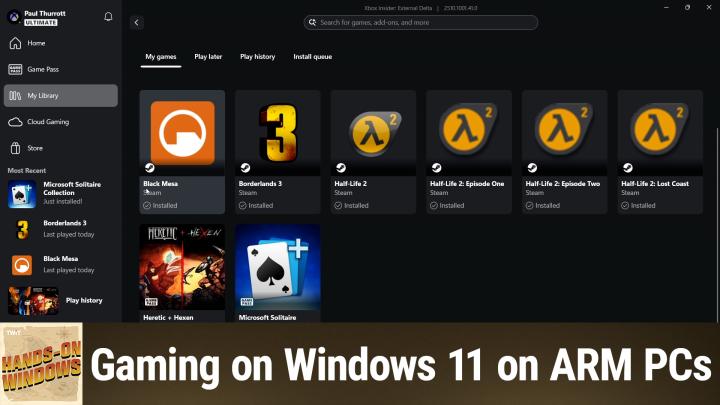
All right, so this is the Xbox app. Most people are familiar with this, but the thing that's interesting about it right now is that this is running on arm. And before, fairly recently, you couldn't access your library inside of an ARM based PC. All you could do if you had that subscription was access this cloud computing option and then find the games that you could stream over the Internet. But they've enabled it on ARM PCs as well. And that's actually really interesting because this is starting to become more available. In other words, right now, my hope here was that they were going to filter the list of games that you see here to the ones that actually work on these computers. For example, I know that Call of Duty is not going to run, and I know that because I tried it.
Paul Thurrott [00:04:47]:
I did the whole 250 gig download, whatever. It doesn't run. It does not run. But there are games that do run, Right? The other thing that's new in here is that they're integrating with other stores. So if you have Epic games, Steam would probably be the most common1, or GOG or whatever. And you have games installed on the PC, those things will appear in your library as well. So if you look at this, this game down here, you can see I got through Game Pass. This game is actually on the computer, but also has a game pass symbol.
Paul Thurrott [00:05:15]:
And then these games here, which is really two games, I guess, spread out over five titles there or six titles. These are from Steam. Right. And so These are actually x86 games. They're not new, they're not brand new, but there's been some work done in at least one case Borderlands, to make these things run a little bit better. The other thing you get in games, I'm going to do it here, just not to distract, of course, is the game bar, which we've looked at in the past and I think recently we even talked about how there is the game Assist, you know, mini web browser that's in there. If you need help when you're playing a game, you can turn him off, you can enable this gaming copilot, etc. So you can kind of interact with it while you play games.
Paul Thurrott [00:06:01]:
You can pin tiles and so forth. There's all the kind of common stuff, the game bar and then also the Xbox app, both support a compact mode that works with those new gaming handhelds. And what that means is that you can use these in a full screen mode. If you have a gaming handheld, that's basically the ui, it's basically the operating system. And you can interact with those two UIs completely through a controller. You never have to grab the mouse, which on a gaming handheld you wouldn't have have anyway. So I'm not going to do that here. This is actually a PC.
Paul Thurrott [00:06:36]:
Of course it's also a Snapdragon PC, but that, that is a possibility. Okay, I don't have my controller installed on this PC right now, but I was using it earlier today. I don't think I really need it for the demo. So I thought I'd show you a couple of games. So the first one is Heretic and Hexen. This was released in late August 2024, but it's a remastered reimagined. Well, not reimagined, it's a remastered version of the original game from 30 years ago. Right.
Paul Thurrott [00:07:03]:
This is one of third party original Doom engine games. And the big innovation here is a sort of mouse look type thing that Doom lacked. Remember Doom, you were always just kind of looking straight ahead. So it's been updated with new music, it's been updated with new user interface for the, the controls and so forth. If I go into the actual. The first of the two games, Heretic, you can see like it's, you know, much smoother, much better. I'm running this in a window. That's not typically the way I would do this, but I'm just doing this to make sure I can monitor it and make sure it's recording correctly.
Paul Thurrott [00:07:35]:
And if I get into, oh, I don't want that, I can load a game that I was already playing. And that's curious. And then, you know, you get the idea. I have to use my keyboard and mouse, which is not what I was doing before. But you, you see the idea. So it's got that kind of mouse look thing. You can go up and down and so forth. And so, you know, this is like, this is 19 every 90s graphics.
Paul Thurrott [00:07:58]:
It's not gonna blow anybody away, but still a great game. And it's cool that this works really, really well actually on these computers, even as even this one, which is, you know, fairly low end. So that's cool. But I was more interested in newer games, right? And look, AAA games, newest games, you're not gonna get. You're not gonna be playing those on these computers. Computers, just to be clear. But thanks to Autosr, for example, there are games like Borderlands 3, which even though they're running emulated, run pretty well. And then there are also games that are older, like Heretic and Hexen, that have been remastered in such a way that they actually look pretty modern.
Paul Thurrott [00:08:38]:
So Black Mesa is a third party mod essentially of Half Life 2, which I also have on here. I'm just going to run one of those two. I'm not going to run both, but this one has better graphics and sound and all that kind of stuff. And so I'm launching this from the Xbox app. Right? This is new. Now, of course, Steam is going to come up. It has to. Steam is our favorite form of malware.
Paul Thurrott [00:09:00]:
It's going to come up all the time, but this thing will log you in and eventually get us into the game. And so if this takes a while, I will skip ahead so you don't have to sit here while it does this whole thing, but let's see how it goes. Okay. All right, so we're in the game, all the menus, everything normal as you would expect. I'll just resume and see where we're at in this game. I don't remember where this is actually, but probably somewhere very early in the game, I would imagine. Oh, no, this is. Yes.
Paul Thurrott [00:09:31]:
So I'm actually stuck at this point, I'm not going to belabor the point here, but this is, you know, you're in that initial level actually at the base and you're to going getting attacked by these guys. I usually place with the controller and the mouse is upside down, so I'm not gonna do too much here, but looks good, right? Half Life 2 and Black Mesa both the graphics settings, which are automatic in this case were both set mostly to high. A couple of, you know, options, medium level. But it looks to me that looks very, very good actually I'm gonna need Steam. I'll leave you there, even though I want to close you. And then Borderlands 3 is maybe one of the better examples of a fairly modern title. I know it's not brand new and in fact Borderlands 4 is coming at any second now, but this is a game that looks great still to this day. There's something really nice about the presentation here and it does run on Windows on arm.
Paul Thurrott [00:10:26]:
In fact, it would run a lot better on a higher end version than what I have here. All right, so Borderlands 3 finally came up. It took a little while. I think the the level loading stuff or the game loading stuff is one of those little problems you're going to get on ARM where it maybe works better on x86, but the game looks good, right? So I can go in, I will load where I loaded the wrong thing. Now I got to figure out how to get back, right? Because it says where it controls, I will continue. So this is wherever I was in the game. It's also very early on in the game. But just to give you an idea of the graphics quality, I think where the save is, I've already eliminated all the enemies in the area, so it's just a big empty area, but let's see what happens.
Paul Thurrott [00:11:11]:
All right, so same thing. Now the graphics quality here is more medium to low, but the presentation is so good. And in this case AutoSR, which is auto super resolution is kicked in. So even though this might be running at a lower resolution than the actual screen, I should point out the games I showed you before, one of them was windowed, so that wasn't true of that one. But can run full screen, full res, Obviously Half Life 2, Black Mesa, both run full screen, you know, full resver, very good frame rates, etc. So this is probably. This could be as low as 1280 by 720 or something, it's hard to say but. But I don't know how to run.
Paul Thurrott [00:11:53]:
So it's running slow, it's not the computer that's slow. It's because I'm not using a controller. But I played games before. I can figure this out. So anyway, you get the idea. So this is some area that's kind of wide open. Lots, you know, it's pretty graphics to me look great. You know, the performance is very good.
Paul Thurrott [00:12:11]:
I mean, I'm walking, you know, but that's just because I don't know what I'm doing. But yeah, it's nice, right? And this is on a computer that gets between 10 and 12 hours of battery life. There is a fan. It doesn't usually kick in. It's probably kicking in now. I can't really hear it because of the, the ambient sound, but normally this thing is completely silent. You know, it's, it's a low end version of the chip even. So to me that's really interesting.
Paul Thurrott [00:12:36]:
Like they've, they've, you know, this, this good work going on, you know, more has to be done, of course, but that's what Microsoft and Qualcomm and their partners in the video game industry are working on. So this is stuff that's coming together for the most part. You don't have to do anything to enable any of this. The trick actually to me is just finding games that work and that's going to be some trial and error. This is something you can Google or use your, whatever search engine. Obviously you can search for native Windows 11 on ARM games. It's actually a pretty long list. But most of them to me are not very exciting or interesting.
Paul Thurrott [00:13:16]:
What you really want to do is find which games will work even if they're just emulated. And it's actually not horrible. And you can find stuff like that as well. So for example, Borderlands 3 is one of the ones that will always come up near the top of the list. There are a few things you can look at, but there's not much to do. So if you go into your display settings, you'll usually see an Auto SR option in here. I'm not seeing on this computer for some reason, but it is on the other laptops I have. But you'll see options like this where you can just set up specific profiles for whatever games.
Paul Thurrott [00:13:53]:
Obviously you want this thing to run high performance, especially on this little computer. And then Black mes, I assume is very. Yeah, yeah, it's going to want to, you know, crank this thing up for those games. Obviously that's fine. This computer doesn't have hdr, but you can turn that on for videos and games if you if your PC supports it and you know, ARM does support, it's just this particular computer. This is typically running at 1920 by 1200. I squashed it down so we could record at 16 by 9. And frankly, I think running native res would actually help, honestly, in the performance department.
Paul Thurrott [00:14:27]:
But for the most part, this stuff just works. If you want to enable Compact mode in the Xbox app, that's here in Settings. And then the game bar has a very similar option. Right. You can see right here. So I'll just throw it in so you can kind of see the difference. Yeah, so you can see now I don't have the controller. So actually using this doesn't make a lot of sense.
Paul Thurrott [00:14:53]:
But the point of doing this is that you can. You can navigate 100% with the controller. So I don't have that controller right here right now, but that doesn't really matter. So. So there you go. I will say, you know, it's been about a year and a half since Windows 11 unarmed debuted with Snapdragon X ray with the copilot plus PCs. You know, the game story has always been a little iffy. It still is, but it's better than it was.
Paul Thurrott [00:15:18]:
And I think this next gen is going to make it even better. And we'll see if Microsoft and Qualcomm can convince more game makers to come up with new games that are just automatically available in a version natively on Windows and Army. So we have a long way to go, but it's looking up. So I hope you found this to be useful. We will have a new episode of Hands on Windows every Thursday. You can find out more at Twitter tv. H O W thank you so much for watching. Thank you especially to our Club Twit members.
Paul Thurrott [00:15:49]:
We love you. If you're not a member, please take a look. It's. You can find it more at Twitter TV Club Twit. You can support all the content creators on the channel and the company. It's something really appreciate. So either way, thank you so much. See you next weekend.