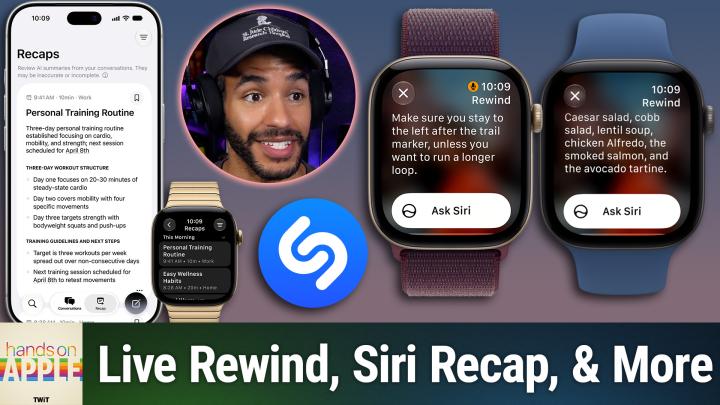
Hands-On Apple 249 transcript
Please be advised that this transcript is AI-generated and may not be word-for-word. Time codes refer to the approximate times in the ad-free version of the show.
Mikah Sargent [00:00:00]:
You're in a meeting and somebody rattles off a name or a room number, and it's gone before you've actually finished writing the first word. Or perhaps you're at a noisy diner and you catch every third word of a story that you're supposed to react to. This Friday, the new Apple Watch ships with a fix for both of those problems and a privacy conversation attached to it. Double press the Digital Crown and the last 15 seconds of what was said shows up as text on your wrist. Leave the other feature on all day and, well, Siri will write up your conversations for you. Sort of. Today we are walking through audio intelligence. What it is, how it works, and where the lines are.
Mikah Sargent [00:00:44]:
Stay tuned. Podcasts you love. From people you trust. This is TWiT. Hello and welcome to Hands-On Apple. I am Micah Sargent, and today we are taking a look at the new audio intelligence features. Well, we're taking a look at what Apple has said about the new audio intelligence features, and we will take a deeper look when said audio intelligence features are available to us. But for now, I want to get ahead of the noise in the conversation so that we can understand what the heck is happening here and what you need to know.
Mikah Sargent [00:01:30]:
So first and foremost, we need to talk about audio intelligence because this is how Apple has defined these new terms. So let's figure it out because it's 4 features that are all tied to one chip and that one chip is on the Apple Watch. So what is audio intelligence? First and foremost, it's important to understand that it does sound recognition. It is the umbrella term for 4 features on the Apple Watch Series 12 and the Ultra 4 that include sound recognition, automatic music recognition by way of Shazam, live rewind, and Siri Recap. So what, what, why are these tied to these actual devices, huh? What, what do we need to understand here when it comes to, uh, the reason that it is hardware locked? Well, it's because the new S11 chip has a secure Exclave, not enclave, exclave. This is a walled-off compartment that's built into the chip where the microphone audio goes, and then the operating system, your apps, you, and even Apple cannot reach in and grab any of this. No audio recordings ever are ever stored. The exclave actually processes the audio and then immediately deletes it.
Mikah Sargent [00:03:07]:
So there's no file to share. There's no subpoena, there's no leak, there's nothing available to anyone to grab from the audio. It is just text transcription. And well, you know, I'm no lawyer, but text transcription by way of an Apple Watch may or may not have context that's needed in a courtroom. Now, sound recognition is the first feature that we're talking about here. And with sound recognition, before we get into the more privacy-focused features, this means that On your Apple Watch on your wrist, the Apple Watch is listening for specific things. This was something that's always been available, or that has long been available on the iPhone, but you can listen for sirens, for alarms, for doorbells, for a baby crying. And so it doesn't matter if your iPhone is across the house.
Mikah Sargent [00:03:58]:
People who are hard of hearing, people who are deaf, well, they are able to make use of a feature that will tell them more about what's going on in their environment. How do you actually go about switching it on? Well, as far as we understand, you do so by going into your settings on your iPhone. You go to Accessibility, you go to Sound and Name Recognition, you go to Sound Recognition, and then you turn on Detect Using Apple Watch. And then if it's already on for your iPhone, don't worry about it because the watch will pick it up automatically. What about Shazam? Well, before you had to tap to get Shazam to work. You no longer have to do that. That's pretty great, right? Settings on the watch, Smart Stack, music detection, and then the song title and the artist will just appear in that Smart Stack, which we've talked about before. So you don't have to tap on the widget to actually get it to listen and recognize what the song is.
Mikah Sargent [00:04:55]:
And each of these features, it's important to understand, are opt-in. Nothing is listening for anything until you say so. And so that's the first thing that you need to know before you get nervous and Perhaps before other people around you get nervous. Just by having a watch on your wrist does not mean that you're constantly listening. So let's break into, I think, the bigger features here, the, the features that people are a little worried about. And the first one is live rewind. It's a feature that gives you the last 15 seconds as text, and it does so on purpose, and it does so with a loud chime so that everyone knows that you're doing it. How does it work? Well, on your Apple Watch, you double press the digital crown, and then what happens is the watch will give you a text snippet of the last 15 seconds of nearby speech, and it'll appear on the display.
Mikah Sargent [00:05:56]:
So it's just an instant replay of a conversation. And when you do this, you can actually ask Siri about it or save it to the Siri app. So what's going on behind the scenes? Well, the Exclave is constantly keeping a rolling buffer, a 15-second buffer that's constantly overwriting itself. Remember, it's in the Exclave. It's not accessible by anyone, and it's just an audio buffer. Nothing, nothing in that buffer even gets transcribed until the moment that you press it. So it isn't listening and typing the whole time in the background your transcript. There's just 15 seconds stored in this box.
Mikah Sargent [00:06:43]:
And when you double press that button, it goes in and gets it. And again, to access it, you need to turn it on. You do so with the Watch app on the iPhone. You go into Siri, you go to Live Rewind, and then of course you double-click the Digital Crown. One thing that you'll probably wanna figure out on day one, something that I'll be looking into, is that right now we've talked about this. What are the sort of muscle memory moments of the Apple Watch? You double press on the crown and it goes into the app switcher. That button map is going to change for us. So the setting does change what that press does.
Mikah Sargent [00:07:23]:
So we'll need to see how it changes. And again, this snippet, temporary by design. About 30 seconds after the display dims, it's gone for good. Unless you tap Ask Siri to ask a question about it, or you save it to the Siri app, then it will sync end-to-end encrypted across your devices. Everything until that tap stays on the watch and on the phone. Ask Siri and Save are the only moments when the text will actually leave and head into the private cloud compute. But up to that point, it doesn't, doesn't do anything. It just is buffering in the background.
Mikah Sargent [00:08:09]:
So again, bear in mind that there is kind of a catch here, and I think it's a good catch. It's a catch that people can relate to. Live Rewind announces itself. It's an audible chime from the watch speaker, and it does so in silent mode. It does so with headphones on, and it also plays a full-screen animation, and it has a microphone indicator as part of that animation. So everyone around you knows you just did it. There's really not a lot you can do to hide it. And I'm sure that there will be people who will figure out different ways to try to reduce the sound, but for the most part, someone boop boop, double-clicking that digital crown and using this feature is announcing themselves as someone who wasn't paying attention.
Mikah Sargent [00:08:54]:
Moving along, we've got Siri Recap, and I think this is the feature that has a lot of people freaked out. But you gotta understand that this is a summary. It is not a transcript, okay? It's notes that you didn't take, summaries that you didn't write, And it's a 7-day clock. Okay? You leave it on during a meeting, for example, or a parent-teacher conference that gives you the ability to stay present. And then afterward, what happens is Siri generates a title, a summary, and key points all within the new Siri app in a special tab called Recaps. And it's not a transcript. That is so important to understand. It is a recap.
Mikah Sargent [00:09:47]:
Apple is explicit about saying that this is a high-level bit of understanding of what's going on. It's like notes that you jot down afterward as you're recalling it yourself. And by design, it will never label who said what. It's not interested in giving you that information. It also can be set up so that it's scheduled by time or location. So that's where it might be handy before you go to a parent-teacher conference to have that information locked in. It lives in the Watch app on the iPhone, so you can run it manually or you can set a schedule by time and location. You can set it to say only run at work, never run at night, and then of course an on/off toggle in Control Center on the watch for the moment that you You know, walk into something that you want to be private.
Mikah Sargent [00:10:40]:
As far as the kind of privacy plumbing goes, here's how everything works in plain terms and in, in my understanding of the sort of flow, right? We've talked about the exclave, the fact that there's this little area on the chip that is separate from everything else that other things cannot reach into and grab the audio. So the watch's exclave, the special listening place, first encrypts the audio, and then it takes that and it hands it to the iPhone's exclave. The iPhone will further transcribe, and in doing so, it will take— it is— it's— Apple literally says it's designed to reduce the transcript by half. So it is making a summary of the actual Conversation that's taking place and boiling it down to less than half its length. From there, that condensed text, so something that's already a summary of what actually took place, goes to private cloud compute, and then private cloud compute, AKA off in the servers, does the full summary. If you're curious kind of what goes along with this information, well, now playing, so whatever you're listening to at the time, calendar info, and then sort of nebulous labels like home or work or your city without giving precise location. So this information is a little bit of context, just enough for Private Cloud Compute to do its work, but it's sort of like playing a game of telephone with a group who's playing a game of telephone with a group who's playing a game of telephone. And Jennifer Pattison Tuohy on This Week in Tech argued that perhaps by the time this gets summarized by summarized by summarized, it may not be as useful as you would imagine.
Mikah Sargent [00:12:51]:
But we'll see. Now, recaps, these summaries, these, uh, these, these Sort of distillations of things that have happened will auto-delete after 7 days. So they last a week unless you choose to save them, at which point you can edit, delete, or export any of them to Notes or to the Journal app, for example, all from the Siri app. I'm excited about being able to put them into my Journal app. Deleting one in one place removes it everywhere. So It's important to note once again that there is a limit. Apple says that summaries can be incomplete, they can be wrong, and that its filter for things like financial details, for example, for ID numbers, may not catch everything. So of course, confirm anything important with an actual human.
Mikah Sargent [00:13:48]:
Now, before you decide to turn it on, let's talk about requirements. Let's talk about timing, and then of course, an understanding that Apple leaves the etiquette to all of us. In order to have it, you need an Apple Watch Series 12 or Ultra 4, and this is to be paired with an iPhone. It needs to be an iPhone 16 or later, not an iPhone 16e. That won't work. So it also needs to have Apple Intelligence and the new Siri AI beta turned on. So again, Series 12 or Ultra 4, it needs that hardware with the Secure Enclave, and then it pairs with an iPhone 16 or later because those are capable of doing the processing on device before they get sent off to private cloud compute. When does this work? Well, once you've got that software set up, it is available when sound recognition And Shazam, those features, the features that will give you, uh, the simple understanding of sounds that are happening around you and also Shazam automatically working, uh, that is as soon as the watches arrive.
Mikah Sargent [00:15:04]:
So September 18th, uh, Friday, as we record this on Tuesday and later publish on Thursday. And then Live Rewind and Siri Recap are, according to Apple, Coming in beta later this year. It will be in English first, and it will not be in the EU to start. Not surprised by that. Both of these server-side features do count against Apple Intelligence's daily usage limits. So just be aware that, you know, a full day of Recaps could hit a ceiling. There are age gates involved, so it is not available to people under 13 years of age. And for teens who are on a child account, a parent or a guardian has to turn it on.
Mikah Sargent [00:15:51]:
But the etiquette question, that's one that Apple can't answer for us, and Apple has not tried to answer for us. No recording exists. No one is supposed to be named, but the people who are sitting across the table from you may still reasonably object, right? And Apple's own document does go as far as to say, Be mindful of the people who may feel that way, which is kind of, uh, just another way of saying, hey, maybe ask. So while this feature's in beta later this year, maybe Live Rewind is for the moments that you missed something, and Siri Recap is only where you'd feel fine saying, hey, by the way, my watch is taking notes. out loud. If you don't feel comfortable saying that, maybe it's not a place where you should have it turned on. So I like to end this with a little bit of homework. If a Series 12 or an Ultra 4 is landing on your wrist this week, as it is on mine, give those features that do work a go.
Mikah Sargent [00:17:00]:
Sound recognition with Detect using Apple Watch and music detection in the Smart Stack with Shazam. See how those Shazam results feel when they show up on their own instead of requiring you to tap. And if you are on an Or watch. Well, this week's assignment is a conversation. Perhaps you ask a person how they'd feel about a friend using Live Rewind or Siri Recap around them. And I would love to know what you and your friends think, so be sure to let me know in the ClubTwit Discord. When the beta ships, we'll do the hands-on, of course. And there's a whole other layer to this story because the new Siri app itself is something we'll have to cover, and Siri AI, which launched this week too.
Mikah Sargent [00:17:45]:
All of it deserves its own episode. So I'll be back next week with another episode of Hands On Apple, but until then, it is time to say goodbye to all of you. Thank you so much for being a subscriber. Thank you so much to those of you who are Club Twit members, and I'll talk to you again soon. Bye-bye. Bye.