Personalize Your AirPods Sound with Apple’s Hearing Test
AI-generated, human-reviewed.
Apple users can now perform a quick hearing test using their iPhone and AirPods Pro—no specialist required. This built-in feature customizes audio output to match your individual hearing profile, making music, calls, and media more clear and enjoyable.
Why Use Apple’s Hearing Test?
On Hands-On Apple, host Mikah Sargent demonstrated how Apple’s hearing test helps users get the most out of their AirPods Pro 2 or 3 by adjusting audio based on unique hearing ability. This feature provides a more tailored listening experience and encourages proactive hearing health, which is especially valuable given how hearing loss can creep up unnoticed.
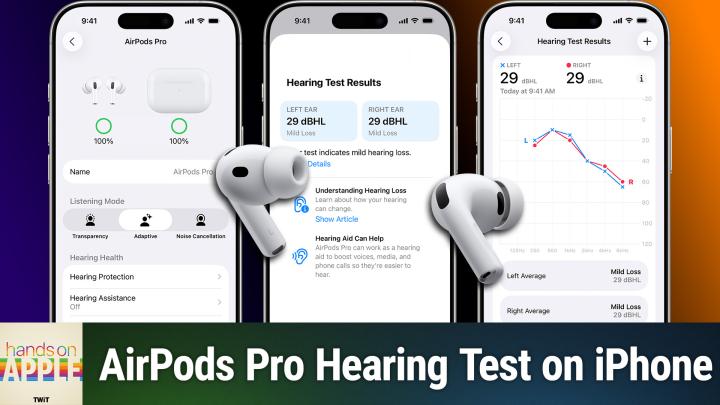
The hearing test is found in the AirPods’ settings on iOS. It uses tones and quizzes to assess hearing ability for each ear. Results are saved in Apple Health and used to automatically tune your AirPods’ audio output.
What You Need
- Compatible AirPods (AirPods Pro 3 or Pro 2)
- An iPhone with the latest iOS update
- A quiet environment for accurate results
How to Apply This: Step-by-Step
- Connect your AirPods to your iPhone.
Make sure your devices are paired via Bluetooth. - Find the Hearing Test Option.
Go to Settings > Your AirPods > Hearing Health > Take a Hearing Test. - Complete the Brief Survey.
The process asks about age, current ear health, and recent exposure to loud environments, as these can affect your results. - Prepare for the Test.
Ensure you’re in a quiet room. The test won’t begin if there’s too much noise. - Fit Your AirPods Properly.
The system checks for a snug fit using internal microphones. - Listen for Tones & Interact. The app will play pulsing tones at different frequencies and volumes. Tap your screen when you hear each sound.
- Check Your Results.
When finished, view your hearing profile (audiogram), see recommendations, and confirm if your AirPods need tuning.
What to Expect During the Hearing Test
Mikah Sargent found that the process takes around five minutes. You’ll be asked to remain silent and listen closely. Some tones may be hard to distinguish, especially if there’s ambient noise or distractions. Results will show your level of hearing loss, if any, and offer tips for maintaining healthy hearing.
Key Takeaways
- The hearing test is easy to access, quick to complete, and can provide instant, personalized audio adjustments.
- Results are saved securely in the Apple Health app, so you can consult your hearing data anytime.
- If you have mild or moderate hearing loss, the AirPods can enhance voices, music, and environmental sounds.
- The test recommends whether Hearing Aid mode is needed—if not, your AirPods keep their standard tuning.
- Apple’s prioritization of hearing health is especially helpful for users concerned about audio clarity or early hearing loss.
If you own AirPods Pro 2 or 3 and an iPhone, taking advantage of this hearing test is a quick, free way to boost your audio experience and keep an eye on your hearing health. The feature empowers you to personalize sound for music, podcasts, and calls—no extra hardware required. For best results, do the test in a quiet environment and follow all prompts carefully.
Ready to try it yourself?
Subscribe for more Apple tips: https://twit.tv/shows/hands-on-apple/episodes/206