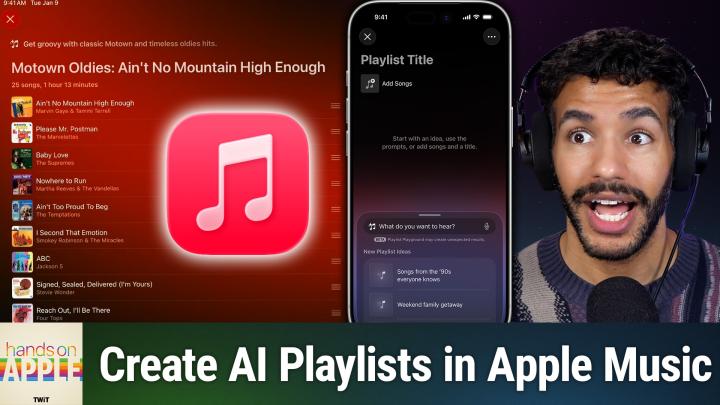
How Playlist Playground Uses AI to Build Your Perfect Mix
AI-generated, human-reviewed.
Apple Music’s Playlist Playground makes personalized playlist creation faster and more intuitive than ever before. By simply describing the kind of music you want, you can generate a curated playlist instantly—no more picking songs one by one.
Playlist Playground is a feature in Apple Music that leverages AI to generate playlists based on your plain language prompts, such as “chill vibes for studying” or “classic Motown hits.” Unlike traditional playlist creation, where you handpick tracks, Playlist Playground quickly fills your playlist according to your description and intelligently arranges songs for a cohesive listening experience. On Hands-On Apple, Mikah Sargent highlighted how this feature is ideal if you’re in a hurry, discovering new music, or looking to match a playlist to a specific mood or occasion without manual curation.
How to Use Playlist Playground
- Requirements:
- An active Apple Music subscription
- An Apple ID for users aged 13 or older
- Internet access
- The latest version of Apple Music on your iPhone, iPad, or Mac
- Accessing the Feature:
- Open the Apple Music app and go to your Playlists section.
- Tap the + (plus) icon or "Create new Playlist."
- You’ll see an option to try Playlist Playground (currently in beta).
- Creating a Playlist:
- Enter a playlist name (optional).
- In the Playlist Playground interface, simply type a description—like “upbeat songs for cleaning” or “golden oldies with Motown vibes.”
- The AI processes your prompt, then creates a playlist of 25+ suggestions, complete with a custom description and even auto-generated artwork if you don’t add your own.
Customizing Your AI Playlist
- Remove Unwanted Songs: Swipe or tap the options to delete tracks that aren’t your style.
- Reorder Tracks: Move songs around for the flow you prefer.
- Add More Songs: Use the “add more songs” option to expand your playlist; new songs are inserted thoughtfully, not just at the end.
- Refresh Your Playlist: Instantly generate a new set with the same theme if you want a fresh mix.
- Edit Cover Art: Choose from auto-generated images or select a photo from your library.
- Share & Collaborate: Let others view or contribute to your playlist, just like any standard Apple Music playlist.
Key Advantages of Playlist Playground
- Speed & Convenience: Build a playlist in seconds, not minutes or hours.
- Flexibility: Tailor playlists for any event, activity, or mood—simply type what you want.
- Better Flow: The AI doesn’t just stack random tracks; it arranges songs in an order that fits the vibe.
- Music Discovery: Easily surface songs and artists you might have missed.
Mikah Sargent pointed out that even those who are particular about playlist structure can benefit from the way songs are sequenced and arranged automatically for smooth transitions and energy levels.
Who Should Use This Feature?
- Casual listeners wanting quick, relevant playlists
- Busy professionals who need music for workouts, cooking, focus, or relaxation without fuss
- Curators and sharers seeking a fast foundation for collaborative playlists with friends or family
- Anyone interested in discovering new songs that match their tastes, without spending time digging
Playground Benefits
If you find traditional playlist creation tedious or are looking for inspiration, Playlist Playground is a valuable tool to maximize your Apple Music experience. The AI’s contextual understanding of your prompts means less time curating and more time enjoying music that fits the moment.
Playlist Playground brings seamless, AI-powered playlist creation to Apple Music subscribers. You get tailored mixes by describing what you want, and the feature is flexible enough to let you tweak results for a personalized touch. With support for collaboration, custom artwork, and integration across Apple devices, it’s a smart step forward in music personalization.
On Hands-On Apple, Mikah Sargent demonstrated how Playlist Playground can change how you listen and discover music—whether you’re prepping for a party, focusing on work, or just relaxing at home. Try Playlist Playground with your next listening session to see how easy smart playlist creation can be.
Subscribe for more tips and tutorials: https://twit.tv/shows/hands-on-apple/episodes/231