iOS Today 792 Transcript
Please be advised this transcript is AI-generated and may not be word for word. Time codes refer to the approximate times in the ad-supported version of the show.
Mikah Sargent [00:00:00]:
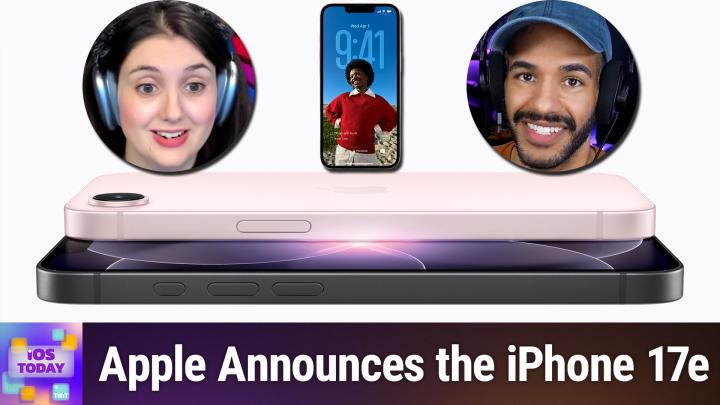
Coming up on iOS Today, Rosemary Orchard and I, Micah Sargent, talk about the new iPhone 17e. Stay tuned.
Rosemary Orchard [00:00:10]:
Podcasts you love from people you trust.
Mikah Sargent [00:00:14]:
This is TWiT. This is iOS Today, episode 792 with Rosemary Orchard and me, Micah Sargent, recorded Tuesday, March 3rd, 2026 for Thursday, March 5th, 2026. 17e. Hello and welcome to iOS Today, the show where we talk all things iOS, iPadOS, watchOS, HomePodOS, and all the other OSes that Apple has to offer.
Rosemary Orchard [00:00:41]:
I am one of your hosts, Micah Sargent, and I am Rosemary Yoshied, and I'm finally back after having a combination of viruses and things which I do not recommend. If you can avoid being ill, uh, hand sanitizer is a great friend. That's all I'm going to say to that.
Mikah Sargent [00:00:59]:
We are very happy to have you back. Uh, it's been sad not having you Hopefully you got a few people saying, you know, wishing you well, et cetera, et cetera, as they knew that you were gone for good reason. But again, we're happy you're back. And I think back just in time for exciting things because we have been hearing rumors for some time now that Apple was slated to release a bunch of products here in the beginning of the year and will perhaps be doing so throughout the year. And part of that is Apple's latest, we don't call it the budget offering, but we do call it the perhaps cost-friendly option. And that is Apple's new iPhone 17e, which of course replaces the 16e. The good thing in terms of what we've got with the latest iPhone is that it actually starts at double the storage capacity from the last gen, but keeps that $599 starter price. It's 256GB of storage now, uh, at that same starter price.
Mikah Sargent [00:02:20]:
And it's available also in 512GB. We've got a black one, a white one, a soft pink one. Uh, these all are supposed to have a sort of soft matte finish. And as we record this show, uh, pre-orders start tomorrow. Tomorrow, but as we publish this show, pre-orders will have started the day before the show publishes and the device is set to be available on March 11th. You know, Rosemary, I'm curious to hear your kind of initial take, your initial impressions. We kind of expected this, I think, and so it's not a shock to see the 17e, but you know, what do you think about the soft pink color, for example?
Rosemary Orchard [00:03:10]:
It's a nice soft pink color. Unlike some of Apple's previous attempts at coloring, it does look like it's actually once seen the color pink and therefore is attempting to bring some of that to life. Unlike the, was it the M4 MacBook Air in blue, which was like somebody had once described what they thought the sky might look like whilst in the same room as the colors being mixed. You know, so it was silver with the slightest hint of blue if you looked at it in the exact right light. But yeah, it looks good. It looks like it's a good phone. It's the expense-friendlier option, I would say, for people who don't necessarily have the budget to upgrade to the Pro or Pro Max or the full edition version of the iPhone. But also, it's great for people who don't necessarily need all of that technology.
Rosemary Orchard [00:04:00]:
For example, if I were looking to buy a new iPhone for my grandmother, I would be looking at 17e, uh, I would not be looking at giving her an iPhone Pro. The only reason why she's got an iPhone Pro is because it's been passed down through the family. It was mine, it was my dad's, it was my mom's, it was my mom's secondary phone for a while, and now it's hers. So in our family, that ends up working out well for us. But for a lot of people, it is a really nice option. Um, you know, it's got a, it's got a nice fast CPU, it's got GPU with the neural accelerators, which, you know, do various things for gaming. Uh, it depends on what sort of level game you're going to be playing on your phone. Most people I know who game on their phones, uh, seriously spend time playing Bellator, Solitaire, that sort of thing, rather than, you know, trying to get the latest, uh, whatever it is, uh, game to, to work, flagship game.
Rosemary Orchard [00:04:57]:
Uh, but yeah, it looks like it's pretty nice, um, and it does also support Apple Intelligence, and it supports it better than the previous generation. Um, so, you know, that's always nice, uh, having those smart options. I have to say, I've been evaluating family members and I'm surprised how many of them will just ask, and be, you know, any assistant for things and be happy with, here are some web results. So yeah, it's good to have actual Apple intelligence, even if it's, you know, as with all these things, not necessarily 100% accurate, but it'll get there. And yeah, I think it's, you know, it's good. It's also energy efficient. It's more energy efficient than the iPhone 16 Pro. So apparently it does have all-day battery life, which is better than the iPhone Air, I suspect.
Rosemary Orchard [00:05:43]:
I don't remember what your experience might have been with the iPhone Air battery life, Micah, but I know some people had some thoughts about the iPhone Air battery life and the fact you could buy, you could buy a MagSafe battery for it from the get-go.
Mikah Sargent [00:05:57]:
Yeah, that, that, that was enough to be like, not so sure. Uh, I, I personally didn't have one or use one, but, uh, they were I've had a few friends who decided that that was the route they wanted to go and then returned them and went a different route. But, you know, depending on, on your needs, it may be enough for you. So there's a lot to kind of dig into here, right? With the new iPhone 17e, we talked a little bit about storage. It's got this A19 chip. It's supposed to be up to like, it's interesting the choices that Apple makes when it comes to, when it comes to what comparisons it makes, we sort of what devices it's compared to. So in terms of its comparison to the iPhone 11, uh, the 6-core CPU is 2 times faster. It's got those neural accelerators like you talked about in terms of the, um, ability to run Apple intelligence, uh, well.
Mikah Sargent [00:07:03]:
I think the connectivity is very important here as Apple kind of sort of covers the gamut of its connectivity options to make sure that they've all got its new cellular modem, um, that it's also more power efficient, all combined together. Um, I don't know. I'm— what are your thoughts on a single camera array? The reason I ask is because I Personally, um, when I think about using my phone camera, I realized that I actually do zoom a lot more than I thought I did. And so I'm regularly taking photos at different zoom levels and some of those are digital. Some of those are actually physical, but having the multi-camera lens on my phone actually does matter to me and Apple. Cleverly tries to make it all work. It's a single 48-megapixel Fusion camera doing all of that stuff. What's— yeah, do you think it's, um, enough to have one camera lens on your phone?
Rosemary Orchard [00:08:14]:
I mean, for me, the thing that stands out is Apple's regular iPhone comes with a standard lens and a wide-angle lens so that you can zoom out, but you can't zoom in really. Um, and the thing that I do most on my phone is I'm trying to take a picture, but I'm too far away from something and I can't physically get closer. It might be because I don't have time to get closer. It might be because I'm standing on the edge of a cliff and I can't literally take a step forward without plummeting to my death. You know, both of which don't seem like great options. Um, but you know, being able to pull out my phone and whack straight into 8x optical zoom— I don't necessarily go straight to 8,, but 2x and 4x are right there on my, on my phone, which are really good options. I would really struggle not to be able to have greater optical zoom. Now, just to be clear, if you don't have the optical zoom, your phone can still do digital zoom, but essentially what it's doing is it's taking a picture and then it's cropping down the pixels.
Rosemary Orchard [00:09:13]:
So if you would have a phone that, a photo that would be, you know, however this big, and then you take a digital version of that, you're taking a smaller picture and essentially stretching it. And at some point you're gonna end up with a lesser quality image because it'll be somewhat blurry because you, you just don't have the pixel stretch. Now, by going with the 48 megapixels, um, that significantly reduces that problem. Most people really aren't going to see the issue. My problem is, is I grew up with a dad who was massively into, uh, you know, cameras and photography. So looking around a DSLR, could you just chuck this telephoto lens in your handbag for me please? That, you know, that was the things I grew up with. So I'm a little bit of a snob when it comes to digital zoom, and I actively try to avoid it. But yeah, I think, I don't know, I think for a lot of people, they don't know about it.
Rosemary Orchard [00:10:06]:
I know my grandmother has struggled previously when taking photos because she was covering one of the lenses on her phone. And so, and she didn't realize that when she was like pinching to zoom in, that she was actually like, her fingers were in the wrong place. And that's why she was getting like, it was suddenly going black because she was covering the wrong lens. She shouldn't be covering any lenses. But yeah, I think a single lens for most people people, it's probably fine. And let's be honest, if you, if you want to do serious iPhone photography, you will be looking at one of the Pro model phones anyway. You certainly won't be looking at the, uh, I guess it's the economy edition, but it— expense friendlier is the name I would probably prefer to stick to myself.
Mikah Sargent [00:10:47]:
Yeah, yeah, I like that one. All right, let's take a quick break. Thank you so much for watching iOS Today. I do want to tell you about our sponsor for this week's episode. It's NetSuite. Bringing you iOS Today. Every business, honestly, they're all asking the same question: how do we make AI work for us? The possibilities are endless, and guessing frankly is too risky. But sitting on the sidelines, that's not an option either, because one thing is almost certain, and that's that your competitors are already making their move.
Mikah Sargent [00:11:16]:
So no more waiting. With NetSuite by Oracle, you can put AI to work today. NetSuite is the number one AI cloud ERP. It's trusted by more than 43,000 businesses. It's a a unified suite that's going to bring together your financials, your inventory, your commerce, your HR, your CRM, all into that very important single source of truth. That connected data is what makes your AI smarter. So it doesn't just guess because it'll actually know. It will intelligently automate routine tasks.
Mikah Sargent [00:11:45]:
It will deliver actionable insights. It will help you cut costs and make fast AI-powered decisions with confidence. Plus, you get total flexibility. Now with NetSuite AI Connector, very exciting, you can use the AI of your choice to connect your actual business data and ask every question you ever had from key customers, cash on hand, inventory trends, plus automate those tiresome manual processes. Let's see your competitor do that. This isn't just another bolted-on tool. It's AI built into the system that runs your business. Whether your company earns millions or even hundreds of millions, NetSuite helps you stay ahead of the pack.
Mikah Sargent [00:12:24]:
If your revenues are at least in the 7 figures, get NetSuite's free business guide, Demystifying AI, at netsuite.com/ai. IOS. The guide is free to you at netsuite.com/ios. netsuite.com/ios. And of course, we thank NetSuite for sponsoring this week's episode of iOS Today. Back to the show. I'm really excited for people who haven't had the opportunity to try MagSafe yet to be able to. I think that that's pretty exciting.
Mikah Sargent [00:12:55]:
Um, only because I see a lot of people moving to MagSafe. And when it comes to— or let me, let me try this again. I see a lot of people using wireless charging now more than ever. Yes. And if you have MagSafe on top of wireless charging, what you get is a much faster charge than you would otherwise get due to the ability of the magnets to align the coil on the phone with the coil in the charger. And that's a fantastic option. So those kind of come together and I think make a difference., for, for people. And I think sort of a, an eye-opening experience, especially like right now my phone is on a MagSafe stand and that's just so handy to have, uh, whenever you need it.
Rosemary Orchard [00:13:45]:
Uh, now, yeah, it also solves the problem of I thought I put my phone on charge, but it turns out it was slightly misaligned. So it was charging, not charging, charging, not charging, charging, not charging, and ends up using more battery because it's continually cycling that and it just gets really hot. And I feel like a lot of people on unfortunately, that was their first experience with wireless charging, you know, trying to do it. It was maybe successful the first couple of times, and then they, you know, thought they dropped it on the pad, and then it turns out, oopsie, misaligned it. And then they had a really bad experience with wireless charging. So, you know, for a lot of people, having MagSafe certainly solves a lot of problems, and it also means you don't have a cable sticking out the side of your phone when you're trying to use it, which then gets bent at an awkward angle and inevitably ends up breaking, which I've quite a few people do, and I've been recommending right-angle cables for those folks for a really long time just to try and avoid that. But, you know, a MagSafe charger is a nicer option where it's appropriate.
Mikah Sargent [00:14:42]:
Yeah, I agree. When we look at, again, comparing the latest iPhone to iPhones of years past or even the current models, it's great that we're getting The safety features, emergency SOS, the roadside assistance, the messages via satellite, Find My via satellite, crash detection, all of that's built in. So what we're seeing is less of a trade-off for the feature set when it comes to these devices. And I think that's important.
Rosemary Orchard [00:15:24]:
Yes.
Mikah Sargent [00:15:24]:
Let's talk about kind of who this phone is for then. If you're rocking an iPhone 11, an iPhone 12, an iPhone 13, and it's just that, you know, you don't get new phones every, you know, regularly, and now it's time to get a new phone. This is the one that I think is going to be a great option for you if you are in that budget friendlier or cost friendlier category. It's, there are trade-in credits. So depending on your carrier, you could get up to $599. From an iPhone 13, $400 for an iPhone 11. That's pretty wild. An iPhone 11 netting $400 potentially.
Mikah Sargent [00:16:05]:
Um, and then again, if you think MagSafe is the something that's important, this is, uh, your option without having to go for Apple's flagship devices. And of course, if you, I think this is the big one that I think of for my everyday folks, the people who aren't steeped in tech, they go, I don't have enough space. On my device for all the things that I'm doing now, that, uh, storage option being doubled at the, uh, you know, at the least expensive tier, but then the, the option to go to 256GB, um, or rather, no, the option to go to 512GB is really great. Um, especially now that we are in a period where most of the video we take is a lot higher, uh, storage cost. Um, Apple, along with releasing the iPhone 17e, also rolled out a bunch of new accessories that can go along with this as well. So you can get new crossbody straps. There's a new clear case, of course, that features MagSafe, and I believe silicone cases that come in 6 different colors. So, um, you know, you can outfit your new iPhone 17e with some fancy new accessories.
Mikah Sargent [00:17:31]:
Anything else that you want to highlight with the iPhone 17e?
Rosemary Orchard [00:17:37]:
I mean, I think it is just, it is a good option for a lot of people, the people who perhaps don't really care about their tech as much, but they want a nice device. And, you know, that I think that is something that is a really good option to have. You don't People don't need to buy the flagship phone every year. People don't need to buy the Pro version of the phone. And if it's one of those things where you just want your thing, your, your device to be good enough, I would say get, get the E version of the phone. And maybe if you've got the budget for it, look at upgrading the storage. Because this is the one thing I find that people, that people do continually run into. They're taking photos, they're taking videos, they're downloading apps.
Rosemary Orchard [00:18:15]:
They don't sit down and delete a bunch of apps that they're not using on a regular basis. Um, And so, you know, they do end up using up a bunch of storage. And yes, you can reclaim that by deleting duplicate photos of where you've taken 10 photos of the same thing. You can reclaim that by sitting down and deleting apps. But it's nice to put that problem off for as long as you can. Also, buy some iCloud storage and make sure that you've got everything backed up, um, and stored online just in case something horrible happens to your device. But yeah, I, I think it's a really nice option and it should be the default one that people consider, especially in this economy.
Mikah Sargent [00:18:50]:
Uh, all right. With that, I do believe it is time to move along to our news. Uh, this of course is iOS Today, but that doesn't mean that we can't briefly touch on some of the other stuff that Apple has announced that we don't typically cover on the show. And that includes, uh, of course, Apple's other announcements. Uh, it has released the new M5 Pro and M5 Max chips. And those, anytime Apple does these, uh, Apple Silicon announcements, it's typically because the new chips are being used in new devices. And so that is paired with a new MacBook Pro and a new MacBook Air that all feature the M5 chip. Are we excited, Rosemary?
Rosemary Orchard [00:19:43]:
I mean, we are excited because while this isn't coming to the iPad this year— don't worry folks, we've got an episode all about the iPad coming up next— um, it is coming to the MacBooks. And what comes to the MacBooks, give it a year, it'll be in the iPads. And so this is going to lead to even more crazy powerful iPad Airs, um, and iPad Pros. So, you know, I think this is really exciting. You know, the, the more performance that we can we get on a device, the less we need to call out to other services outside of our home and things like that. So the more we can just do— we can have super crazy amazing graphics on an iPad, and we can have Apple Intelligence running completely locally if we want with crazy local models and doing all sorts of fancy and wonderful things, which means that we can also just have more powerful nerdy apps doing things as well. Because I can guarantee you there are game developers out there going, cool, there's all Oh, it's got these, you know, multi-threading capabilities. I'm going to do this with it.
Rosemary Orchard [00:20:43]:
And then you get the really, really nerdy programmer people who, you know, they work for Omni Group, they work for Devon Tech and things like that. And they're going, cool, how can we make a better task manager? What can we do in OmniPlan with this? What can I do in DevonThink with this? And all of these people are just sitting there going like, mm-hmm, rubbing their hands like the little happy little raccoon, you know, meme. That you get because all of these do just enable more powerful devices and this will end up in our iPhones, uh, at some point, you know, not necessarily exactly as it is because these chips are relatively speaking quite large and trying to cram that into an iPhone, um, Pro Max, Max, Max, Max, Max might be required, but you know, we will get there. Um, so yeah, it's more exciting things and I believe also, uh, the MacBook Air, might be in some exciting colors or vaguely exciting colors. I think I saw a mockup, but I might not have actually seen that in the actual article. I think it possibly is just gold and space gray once more, but you know, it's the possibility of colors.
Mikah Sargent [00:21:46]:
Yeah, exactly, a possibility of colors. Um, obviously we're gonna continue to keep an eye on what Apple might be, uh, announcing as the weeks go on. But for now, these new M5 chips making their way into Apple's latest hardware is very exciting because it means that, you know, the product cycles keep pushing forward, the new features keep pushing forward. It won't be long before WWDC is here and we'll have so much more to talk about as the next versions of these soft— as the next version of these software platforms rolls out. Very exciting stuff. All right. With that, it is time to move along to our App Caps. Our App Caps are next.
Mikah Sargent [00:22:36]:
This is the part of the show where we share our app or gadget picks of the week, the things that we are using that we love, that we think you all should know about. And this week, it's interesting because my pick is a choice that is, uh, something that goes along with what I already have. What, what does he mean? Well, So I told you before about the Spigen case. Oh, I don't— wait, hold on. I almost showed the—
Rosemary Orchard [00:23:10]:
showed the reveal.
Mikah Sargent [00:23:12]:
Like, spoilers. So I showed you the case. This is an amazing case that gives this vibe of an old school Mac. It has this great sort of rubberized component and then a harder case goes on the outside. It has magnets built into it so that it is MagSafe compatible all the way through. And one of my favorite features, or sort of not features, but, um, it's a, it's, it's a nice little touch is what I'm, what I'm looking for is that the, uh, button on the side button says hello, uh, in that cursive typeface. Now showed you that before. And one of my favorite things is these days is a lanyard loop, right? And I had just a generic lanyard loop on there.
Mikah Sargent [00:24:02]:
Well, I was browsing Amazon the other day and I just so happened to see that the company has released a wrist strap specific for this case. It is the beautiful beige color. The threading is orange. The little tip of it also has that hello on it. And what's great about it is this is an attachable and detachable quick attach clip. And so I can pop this on and my phone is good to go, but I can press that little button and pop it off. And now my phone is free from the little lanyard strap. I love this thing.
Mikah Sargent [00:24:54]:
I love this case, and I love the new wrist strap. The wrist strap is $20, um, on Amazon, and I think, uh, the other— the case itself is $40. So $60 all in. Um, but I am loving these two, uh, paired together. This is— it's a delight. It's an absolute delight. And good on, uh, Spigen for making such a great, um, great, just, it's so clever. It's so clever set of accessories.
Mikah Sargent [00:25:27]:
All right, that's mine.
Rosemary Orchard [00:25:29]:
Rosemary, tell us about yours. Well, mine, Micah, is also hardware, though slightly more hard than a nice soft wrist strap in the sense of, I don't know how to pronounce the company name, so I'm gonna go with Absolut. And this is the M4 snap-on mobile controller. So it comes with a MagSafe ring. It also comes with an actual ring. Actual like stick-on MagSafe ring in the box if your phone, for example an iPhone 16e, um, or an Android, does not support MagSafe. Um, but this is the actual controller. Now this connects to your phone via Bluetooth, uh, so I'm just going to turn it on a second.
Rosemary Orchard [00:26:04]:
And it's got a whole bunch of buttons on it which, if you've ever played on a Game Boy, might look quite familiar. So you've got your A, B, uh, X, Y pad, you've got your standard D-pad, you've got some extra buttons up here. There are two buttons on each side at the top, and then you've got your plus, minus, and home buttons. So I'm just gonna make sure this is turned on because this will then allow you to connect it to your phone because it connects via Bluetooth. And if you download a really cool app called the Delta Emulator, then you— if you've got Game Boy games like cartridges, there's actual— you can buy a little thing off of Amazon somewhere to get the games off of the cartridges and put them into the emulator. So instead of looking at Game Boy around with you, uh, you can just look, grab your little controller, and I would MagSafe it to my phone, um, to demonstrate this, but that's gonna make it slightly more difficult. But I can play actual Tetris on my phone with a little controller, and it's really great. So I actually have the original Tetris game, so I went through the process of, uh, lifting it off to make sure that, uh, it's, uh, you know, I actually have it here.
Rosemary Orchard [00:27:16]:
Um, it's a little weird not playing this on my controller. Why is this not working? Uh, there we go. Um, and there we go. And now I can just rotate the blocks and move them around. And it does, you know, because I've pulled the actual game, I have the full music and everything. I've turned it off to make sure that, uh, we don't get into any trouble here at TWiT because we don't want that. But it's really nice to be able to play Tetris on my phone, you know, waiting to go see, get, have an appointment or anything like that. I can just, you know, get on with my day and have this in my bag.
Rosemary Orchard [00:27:55]:
It's tiny, takes up practically no space. And, you know, it also, you know, connects to my phone in a really nice little way. So I've now got performance anxiety playing Tetris. So I'm just gonna press the pause button there. Because it's, you know, it's one of these things where I can play Tetris for a really long time by myself. As soon as somebody else is watching me, I get really worried, uh, that somebody— they're judging me, which they should be. I'm not good at Tetris. I can just play, you know, I, I can work around my mistakes for long enough to keep going.
Rosemary Orchard [00:28:25]:
That is the secret. Um, but it's, it's good fun. And, uh, yeah, I, I like the fact that I can basically play any game using the Delta emulator. So that is a bonus recommendation. It's a 2-for-1 special Okay, uh, so Delta emulator, um, and then you can put your Game Boy games or any other kind of, uh, console games that would work with this in there. And, uh, yeah, it's, uh, this was, uh, £35, um, and so I suspect it's about $40 or so, uh, plus postage. It is coming from abroad, so obviously imports and things like that may apply, um, but that's all detailed on the Abylute website. That's A-B-X-Y-L-U-T-E.
Mikah Sargent [00:29:01]:
Uh, but we will have a link in the show notes and we will, folks, that is going to bring us to the end of this episode of iOS Today. I remind you all that you can reach out to us, iosToday@twit.tv is how you get in touch to leave your feedback, to ask your questions and even more. Thank you so much for tuning in to this episode of iOS Today. I want to remind you all about Club Twit, our offering for membership. When you join the club at twit.tv/clubtwit or scan that QR code in the top corner there, uh, you You can join $10 a month, $120 a year, and doing so gets you access to some awesome benefits. Every single one of our shows ad-free, just the content. You also gain access to our special feeds. That includes our feed that has behind the scenes, uh, before the show, after the show, little clips and bits.
Mikah Sargent [00:29:51]:
We've got a feed that has our live coverage of tech news events, and we've even got a feed that has all of our special club shows like My Crafting Corner, We've got Stacy's book club and so much more all there in the club. You can also join our Discord, which is a fun place to go to chat with your fellow Club Twit members and those of us here at Twit. If all of that sounds good to you, twit.tv/clubtwit is where you go to sign up. Rosemary Orchard, if people would like to follow you and keep up to date with the awesome work you're doing, where should they go to do so?
Rosemary Orchard [00:30:24]:
At the best place is rosemaryorchard.com, which has got links to apps, books, podcasts, and of course, all my social media. Sites, or you can find me in the Club Twit Discord, where people are checking that somebody who's having issues with the YouTube stream isn't just leaning on the spacebar, but also there's lovely nerdy chats during the show and after the show. Micah, where can folks find you?
Mikah Sargent [00:30:44]:
If you're looking to find me online, I just remembered that I need to update this. So by the time you hear it, it will be fixed because the Bento service unfortunately is no longer around. So heading to chihuahua.coffee, chihuahua.coffee, Uh, you will find links to the places I'm most active online. For now, it just redirects to an advertisement, but again, that will be gone by the time you, uh, check this out. So head to chihuahua.coffee, C-H-I-H-U-A-H-U-A.coffee, uh, and I look forward to hearing from you. Alrighty, that is that on that. Thank you all for tuning in. We'll catch you again We'll see you again next week for another episode of iOS Today.
Mikah Sargent [00:31:31]:
Bye-bye. If you like what you heard and you want more of this week's top stories in tech, well, subscribe to Tech News Weekly. Every Thursday, I talk with the journalists making and breaking the tech news.